> ## Documentation Index
> Fetch the complete documentation index at: https://docs.speckle.systems/llms.txt
> Use this file to discover all available pages before exploring further.
# Share your Models
> View your 3D Model anywhere
## What is model sharing in Speckle?
Model sharing in Speckle means sharing model access with links or embeds so
others can view and interact in a browser.
## Share using a URL link
With Speckle, sharing your 3D models is as easy as copying a link or embedding an interactive viewer—no huge file
transfers required. Because Speckle is a web app, you can access and interact with your models from any device—desktop,
tablet, or phone—from anywhere with an internet connection. **No special software or licenses are required to view and
interact with models;** everything runs right in your browser.
Looking to create advanced analytics and dashboards from your model data? Check out [Speckle
Intelligence Dashboards](/analytics/intelligence-dashboards) for interactive dashboards and
insights.
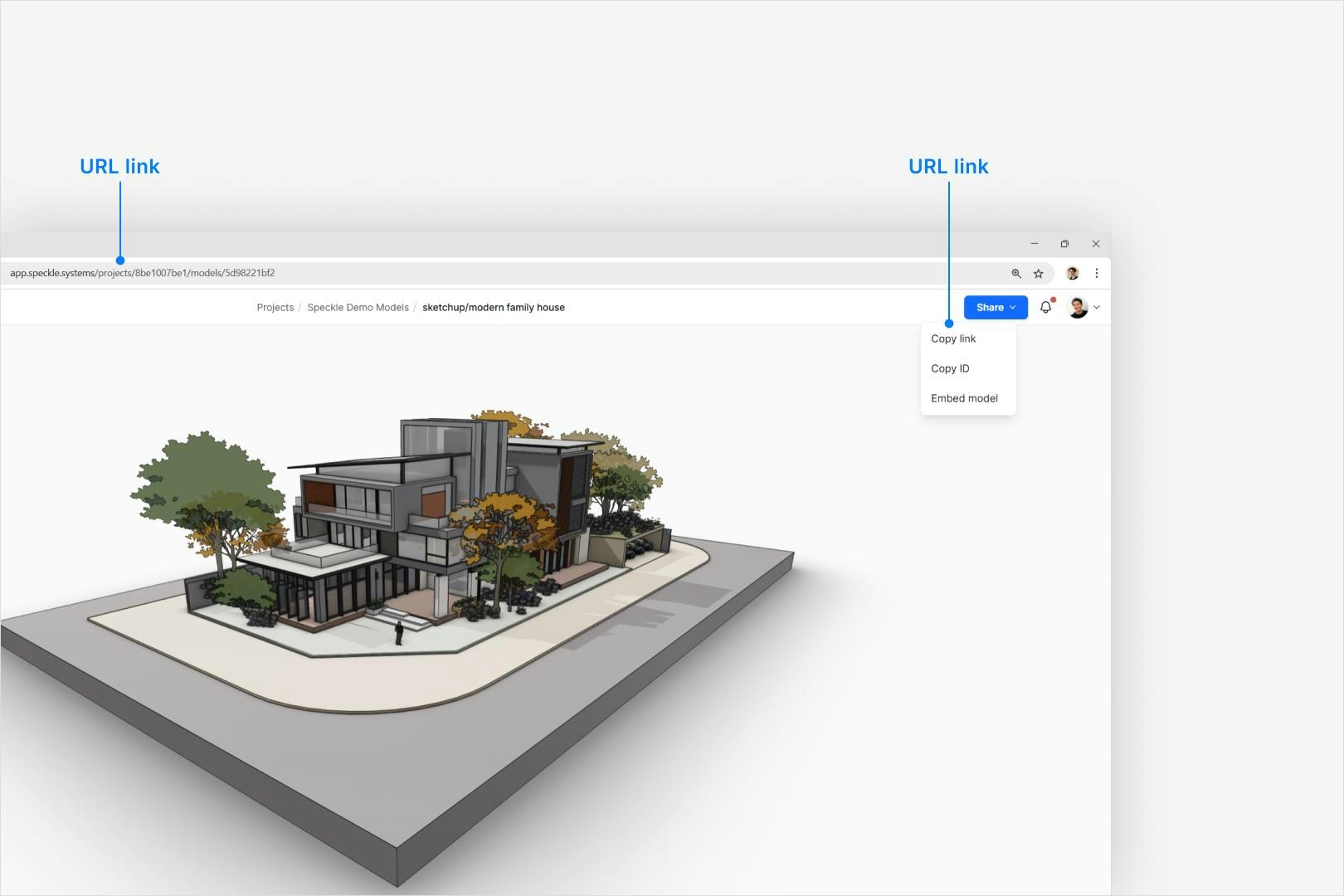
You have two simple ways to share your Speckle model:
1. **Copy and paste the URL**\
Just grab the link from your browser's address bar and send it to anyone who needs access.
2. **Use the Share button**\
Click Share in the top-right corner, then select Copy link. Paste that link wherever you like.
 If someone can't open your link, check your project's permissions. You may need to give them
access to your workspace or project first. For details, see [Managing Access and
Permissions](/workspaces/roles-and-seats) guide.
## Embed the 3D viewer
If someone can't open your link, check your project's permissions. You may need to give them
access to your workspace or project first. For details, see [Managing Access and
Permissions](/workspaces/roles-and-seats) guide.
## Embed the 3D viewer
 ### Options and settings
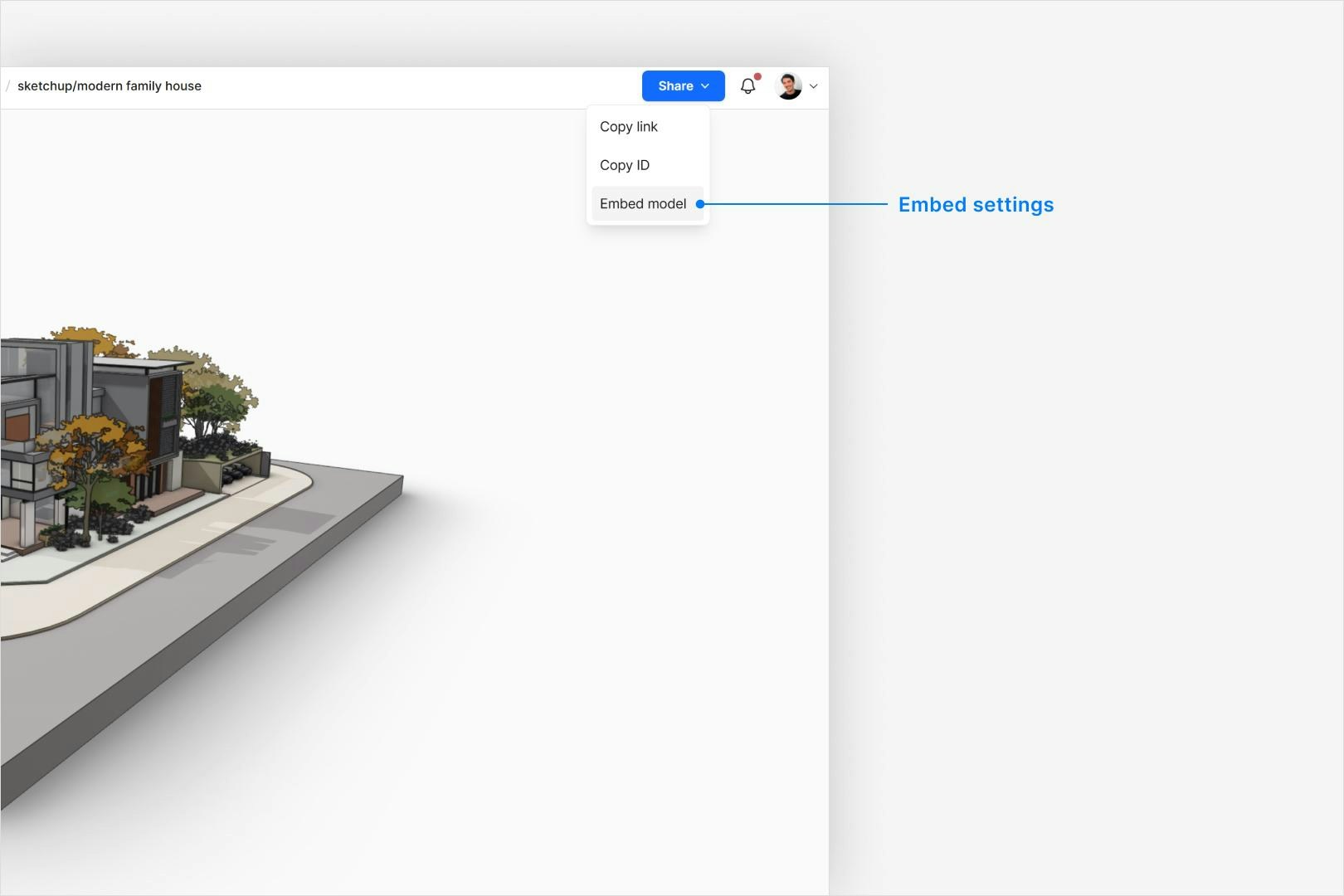
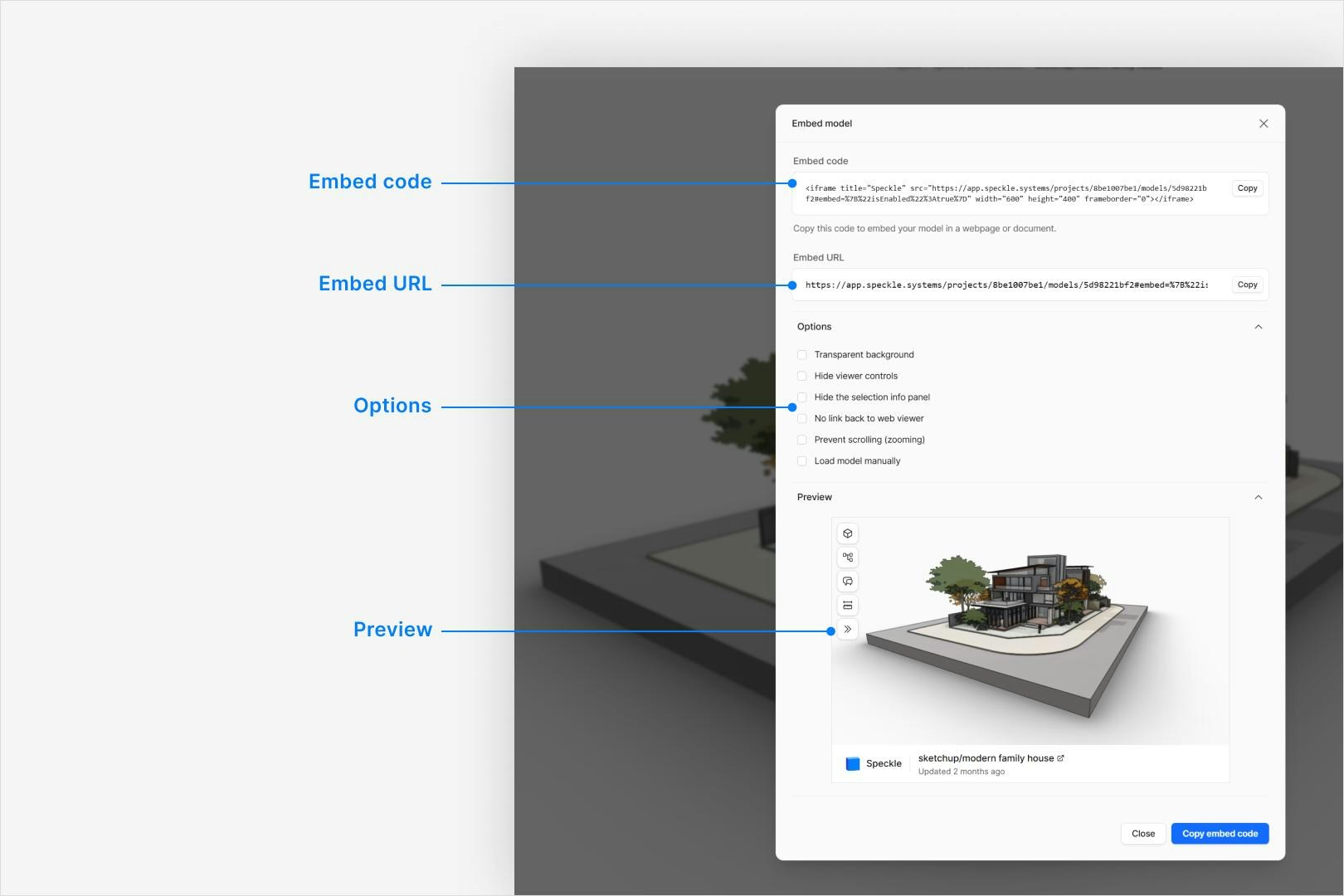
* **Embed code (iframe)**: Use when adding the viewer to another website.
* **Embed URL**: Use when you need a direct link without iframe code.
* **Viewer options**: Choose transparent background, hide controls, hide
selection panel, prevent scroll zoom, or enable manual load.
### Options and settings
* **Embed code (iframe)**: Use when adding the viewer to another website.
* **Embed URL**: Use when you need a direct link without iframe code.
* **Viewer options**: Choose transparent background, hide controls, hide
selection panel, prevent scroll zoom, or enable manual load.
 ## Secure share links
The Share dialog can create a share token instead of relying only on workspace
or project membership.
* **Set an expiry date:** Make links stop working automatically after a specific
date.
* **Add password protection:** Require recipients to enter a password before
they can open the shared model.
* **Add a label:** Add an internal label (for example `Client review`) so you
can identify the token later.
If a link is password protected, recipients are redirected to an unlock page
before the model loads.
You can review and revoke issued share tokens in **Project settings > Tokens**.
## If sharing does not work
Check these first:
* User cannot open link -> confirm project visibility and role permissions.
* Embed does not load -> confirm URL is full and iframe is not blocked by host.
* User can open but not interact -> check viewer options used in embed settings.
* Private view still hidden -> shared link does not override private visibility.
## FAQ
No. Regular project links still follow project visibility and role-based
access.
Yes. Recipients can open shared model links in a browser without connector
installation.
Use embed URL for direct navigation links. Use iframe code when placing the
viewer inside another product or page.
Yes. Create a share link from the Share dialog. You can optionally add an
expiry date and password. Anyone with the link can view the shared model
without signing in.
The token stops working. Recipients can no longer access the shared model
with that link. Create a new share link if access is still needed.
Yes. Open **Project settings > Tokens** and revoke the token.
Viewer behavior may be constrained by embed options, such as hidden controls
or manual load mode.
## Examples
### Speckle in Miro
## Secure share links
The Share dialog can create a share token instead of relying only on workspace
or project membership.
* **Set an expiry date:** Make links stop working automatically after a specific
date.
* **Add password protection:** Require recipients to enter a password before
they can open the shared model.
* **Add a label:** Add an internal label (for example `Client review`) so you
can identify the token later.
If a link is password protected, recipients are redirected to an unlock page
before the model loads.
You can review and revoke issued share tokens in **Project settings > Tokens**.
## If sharing does not work
Check these first:
* User cannot open link -> confirm project visibility and role permissions.
* Embed does not load -> confirm URL is full and iframe is not blocked by host.
* User can open but not interact -> check viewer options used in embed settings.
* Private view still hidden -> shared link does not override private visibility.
## FAQ
No. Regular project links still follow project visibility and role-based
access.
Yes. Recipients can open shared model links in a browser without connector
installation.
Use embed URL for direct navigation links. Use iframe code when placing the
viewer inside another product or page.
Yes. Create a share link from the Share dialog. You can optionally add an
expiry date and password. Anyone with the link can view the shared model
without signing in.
The token stops working. Recipients can no longer access the shared model
with that link. Create a new share link if access is still needed.
Yes. Open **Project settings > Tokens** and revoke the token.
Viewer behavior may be constrained by embed options, such as hidden controls
or manual load mode.
## Examples
### Speckle in Miro
### Speckle in Notion