> ## Documentation Index
> Fetch the complete documentation index at: https://docs.speckle.systems/llms.txt
> Use this file to discover all available pages before exploring further.
# Databricks
> Register read-only Databricks tables as data sources in Speckle for the AI chat and data tools.
The Databricks integration is in **Beta** and is enabled per workspace. Before you can register
tables, an IT administrator must prepare Databricks and connect the SQL warehouse in Speckle. If
your project's **Integrations** does not show Databricks, ask your IT administrator to follow
[Enable Databricks integration](/workspaces/it-admin-databricks-integration).
## Setup
These steps assume an IT administrator has already connected a Databricks SQL warehouse in Speckle. If it hasn't, your IT administrator must complete [Enable Databricks integration](/workspaces/it-admin-databricks-integration) first.
In Speckle, open your project's **Integrations > Databricks**, expand **catalog > schema**, and find the table you want. Only catalogs, schemas, and tables your IT administrator has granted access to will appear. Select a table to preview its rows.
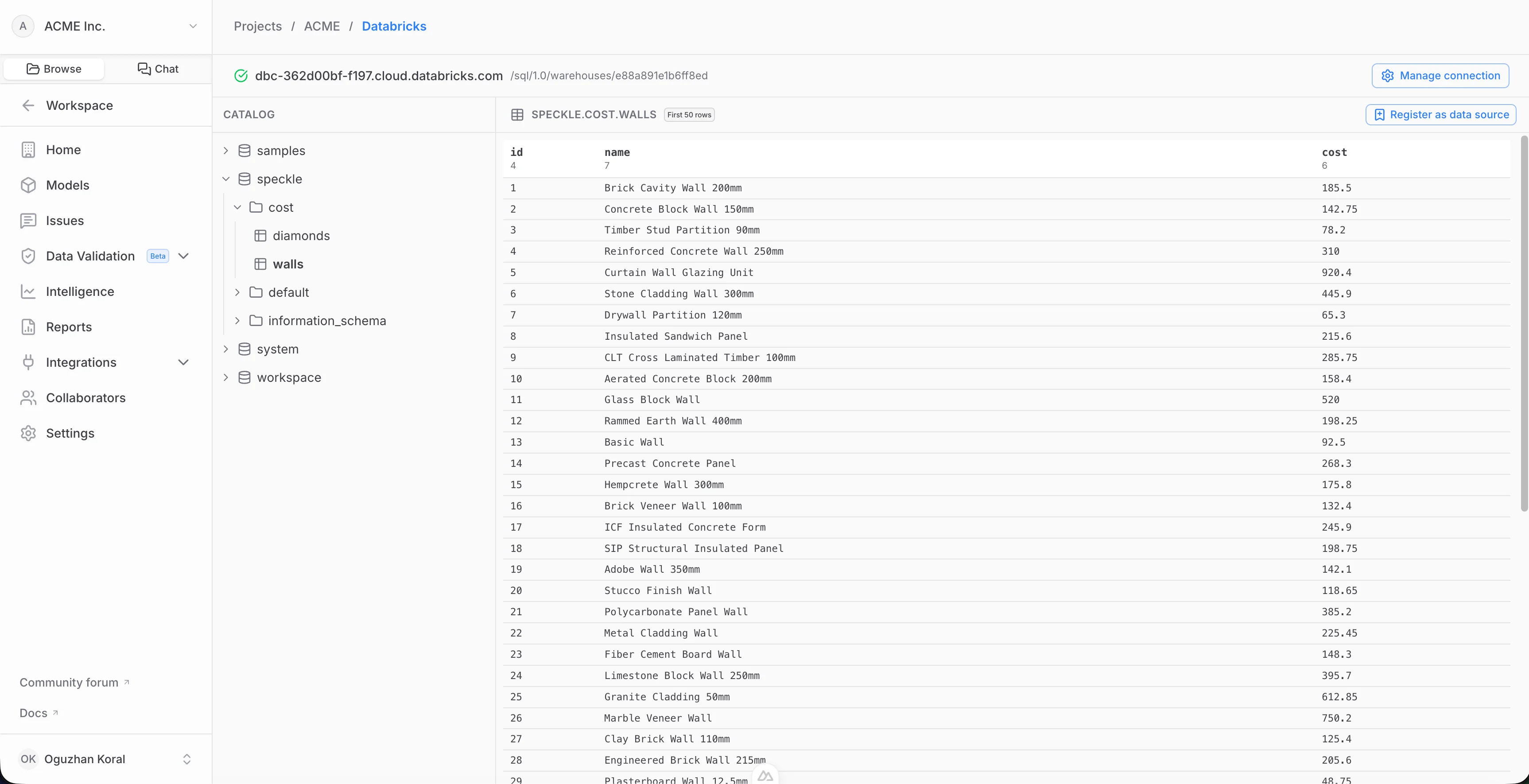 You can preview the table rows before registering.
Pick the **columns** to include — only the columns you choose are ever read or cached — then select **Register**. Speckle validates access, reads the selected columns, and builds the first snapshot. The table now appears as a registered data source.
You can preview the table rows before registering.
Pick the **columns** to include — only the columns you choose are ever read or cached — then select **Register**. Speckle validates access, reads the selected columns, and builds the first snapshot. The table now appears as a registered data source.
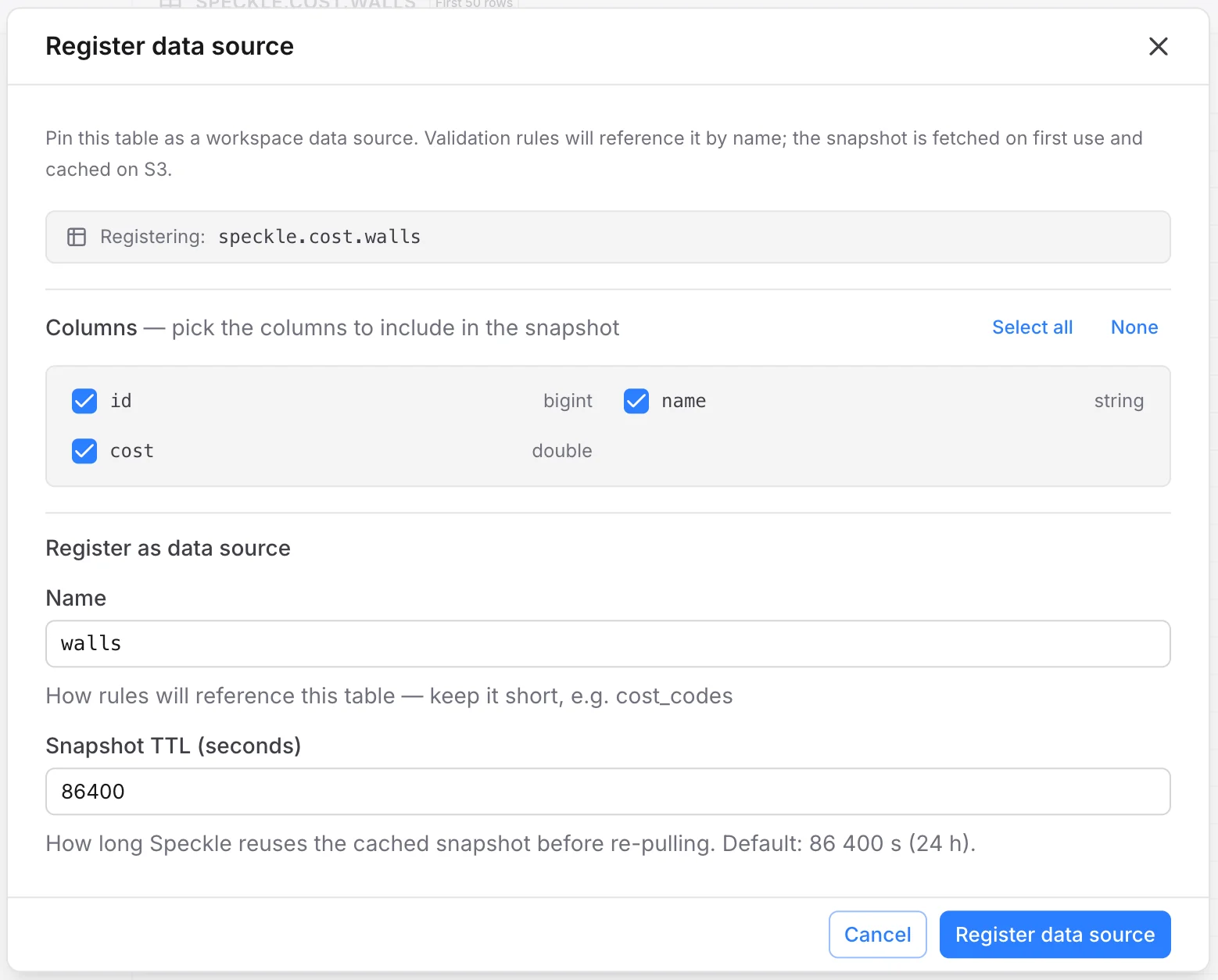 The table appears as a registered data source in your project.
Registered data sources are available to Speckle tools such as the **AI chat**, where you can query the table and combine it with your model data. See [Intelligence Dashboards](/analytics/intelligence-dashboards) for analytics and data tools. Help shape this workflow on the [Databricks integration study](/get-involved/user-testing#databricks).
## How snapshots are stored and refreshed
When you register a table, Speckle reads the columns you selected and stores a cached **snapshot** in your workspace's object storage. Tools query the snapshot rather than your live warehouse.
* **Automatic refresh.** A snapshot is rebuilt from the warehouse when it goes stale (default freshness window: 24 hours), the next time it's used.
* **Manual refresh.** You can force an immediate refresh from the registered table's controls — useful right after the source data changes.
* **Disconnecting.** If your IT administrator removes the Databricks connection, registered sources keep serving their **last snapshot read-only**. Reconnecting the same warehouse relinks them and resumes refreshing.
## FAQ
Only the columns you select when registering a table. Columns you don't include are never
queried or cached.
Speckle stores a snapshot of your registered columns and refreshes it on a schedule. See [How
snapshots are stored and refreshed](#how-snapshots-are-stored-and-refreshed).
Your registered sources keep serving their last cached snapshot read-only, so existing tools
don't break. If your IT administrator reconnects the same warehouse, refreshing resumes.
No. The integration is **read-only** — Speckle issues `SELECT` queries only and never writes,
updates, or deletes data in Databricks.
The table appears as a registered data source in your project.
Registered data sources are available to Speckle tools such as the **AI chat**, where you can query the table and combine it with your model data. See [Intelligence Dashboards](/analytics/intelligence-dashboards) for analytics and data tools. Help shape this workflow on the [Databricks integration study](/get-involved/user-testing#databricks).
## How snapshots are stored and refreshed
When you register a table, Speckle reads the columns you selected and stores a cached **snapshot** in your workspace's object storage. Tools query the snapshot rather than your live warehouse.
* **Automatic refresh.** A snapshot is rebuilt from the warehouse when it goes stale (default freshness window: 24 hours), the next time it's used.
* **Manual refresh.** You can force an immediate refresh from the registered table's controls — useful right after the source data changes.
* **Disconnecting.** If your IT administrator removes the Databricks connection, registered sources keep serving their **last snapshot read-only**. Reconnecting the same warehouse relinks them and resumes refreshing.
## FAQ
Only the columns you select when registering a table. Columns you don't include are never
queried or cached.
Speckle stores a snapshot of your registered columns and refreshes it on a schedule. See [How
snapshots are stored and refreshed](#how-snapshots-are-stored-and-refreshed).
Your registered sources keep serving their last cached snapshot read-only, so existing tools
don't break. If your IT administrator reconnects the same warehouse, refreshing resumes.
No. The integration is **read-only** — Speckle issues `SELECT` queries only and never writes,
updates, or deletes data in Databricks.