> ## Documentation Index
> Fetch the complete documentation index at: https://docs.speckle.systems/llms.txt
> Use this file to discover all available pages before exploring further.
# Use SpeckleSharp in a Grasshopper C# node
> Build DataObjects and Collections from Grasshopper geometry and computed metadata, then inspect the object graph locally
This guide teaches building Speckle object graphs inside Grasshopper — computed metadata, nested collections, and local inspection — without publishing to a server first.
**When to use it:** enrich Grasshopper geometry with SDK types before or alongside the connector. **Read next:** [Grasshopper Objects](/connectors/grasshopper/grasshopper-objects) for connector basics, then [Work with model objects](/developers/sdks/dotnet/concepts/objects-and-traversal).
## When to use the SDK vs connector components
The Speckle Grasshopper connector (Publish, Load, passthrough nodes) is the right tool for **moving data** to and from Speckle. SpeckleSharp in a C# Script is the right tool when you need:
* **Custom analysis** that connector nodes do not provide
* **Extracting or restructuring** model data programmatically
* **Creating reports** with computed fields derived from geometry
* **Combining Speckle data** with Grasshopper logic in one pass
* **Prototyping workflows** before turning them into a plugin or automation
Use connector nodes for transport. Use the SDK for construction, enrichment, and analysis. The SDK does **not** replace Publish and Load — it complements them.
| | Grasshopper Speckle components | Speckle.Sdk in a C# Script |
| -------- | ---------------------------------------------- | ---------------------------------------------------------------------- |
| Role | **Move** data | **Construct, enrich, analyse** data |
| Examples | Publish, Load, passthrough params, Deconstruct | `DataObject` + derived `properties`, `Collection` hierarchy, `Flatten` |
## When connector nodes are enough
Passthrough nodes move and lightly edit data on wires. They do not execute graph-wide computation, derive per-element metadata from geometry, or assemble nested collections from grouping rules. **Deconstruct** inspects one param at a time; **Speckle.Sdk** constructs and analyses the whole graph; **Publish** exchanges it.
## Ecosystem progression
```
Developer Nodes → SDK (this guide) → Publish / Load
inspect construct, enrich exchange
```
| Layer | Tool | Role |
| ------------- | ------------------------------------------------------------------------------ | ------------------------------------------------------------------------------------------------------------------------ |
| **Inspect** | [Developer Nodes](/connectors/grasshopper/grasshopper-developer) — Deconstruct | See what is on a wire; one object at a time |
| **Construct** | **Speckle.Sdk in C# Script** — **this guide** | Build graphs, computed metadata, hierarchy, traverse at scale |
| **Exchange** | Publish / Load | Move data to and from Speckle — [Grasshopper connector](/connectors/grasshopper/grasshopper); not taught in the main arc |
```mermaid theme={null}
flowchart LR
subgraph inspect [Developer Nodes]
Dec[Deconstruct]
end
subgraph inputs [Grasshopper]
Pts[Points]
Grid[Grid lines]
end
subgraph sdk [SDK - this guide]
Compute[Derived properties]
DO[DataObject]
Col[Collections]
Insp[Flatten and inspect]
end
subgraph exchange [Connector - not this guide]
Pub[Publish]
end
Pts --> Compute
Grid --> Compute
Compute --> DO --> Col --> Insp
Insp -.->|"optional later"| Pub
Dec -.->|"inspect published data"| inspect
```
Solid lines = main guide. Dotted = ecosystem / appendix only.
 ## Mission and when you need the SDK
Passthrough nodes move geometry and attach **static** attributes. They do not run graph-wide computation or build nested structures from rules. The use cases above cover when to reach for Speckle.Sdk in a C# Script.
The same workflow applies to room footprints (`floorArea`, `occupancy`, `carbonEstimate`, `qaStatus`) or any case where **per-element computed fields** do not scale on wires.
## Prerequisites
* Rhino 8 and a Grasshopper **C# Script** component (**Maths** > **Script**)
* Familiarity with [Developer Nodes](/connectors/grasshopper/grasshopper-developer) — especially **Deconstruct** for the inspect layer
* Awareness that **Publish** exists on the connector (exchange layer) — not required to complete this exercise
* [DataObject and Collection](/developers/sdks/dotnet/concepts/objects-and-traversal#dataobject-and-collection) — the containers this guide builds
## Set up the C# Script component
Add a C# Script to your canvas and declare these inputs and outputs. Geometry comes from Grasshopper; **Speckle-facing metadata is computed in the script**, not wired in as static lists.
| In / out | Type | Role |
| -------------- | --------------- | ---------------------------------------- |
| `pts` | `List` | Pier or footing locations |
| `gridLines` | `List` | Closest-line index for `nearestGridLine` |
| `capacity` | `double` | Denominator for `utilization` |
| `elementCount` | `int` | Count after `Flatten` |
| `summary` | `string` | Report of computed fields |
| `status` | `string` | Validation message |
Do not add `category` or `loads` as dumb inputs — those values are **derived** in code.
## Install packages and minimal bootstrap
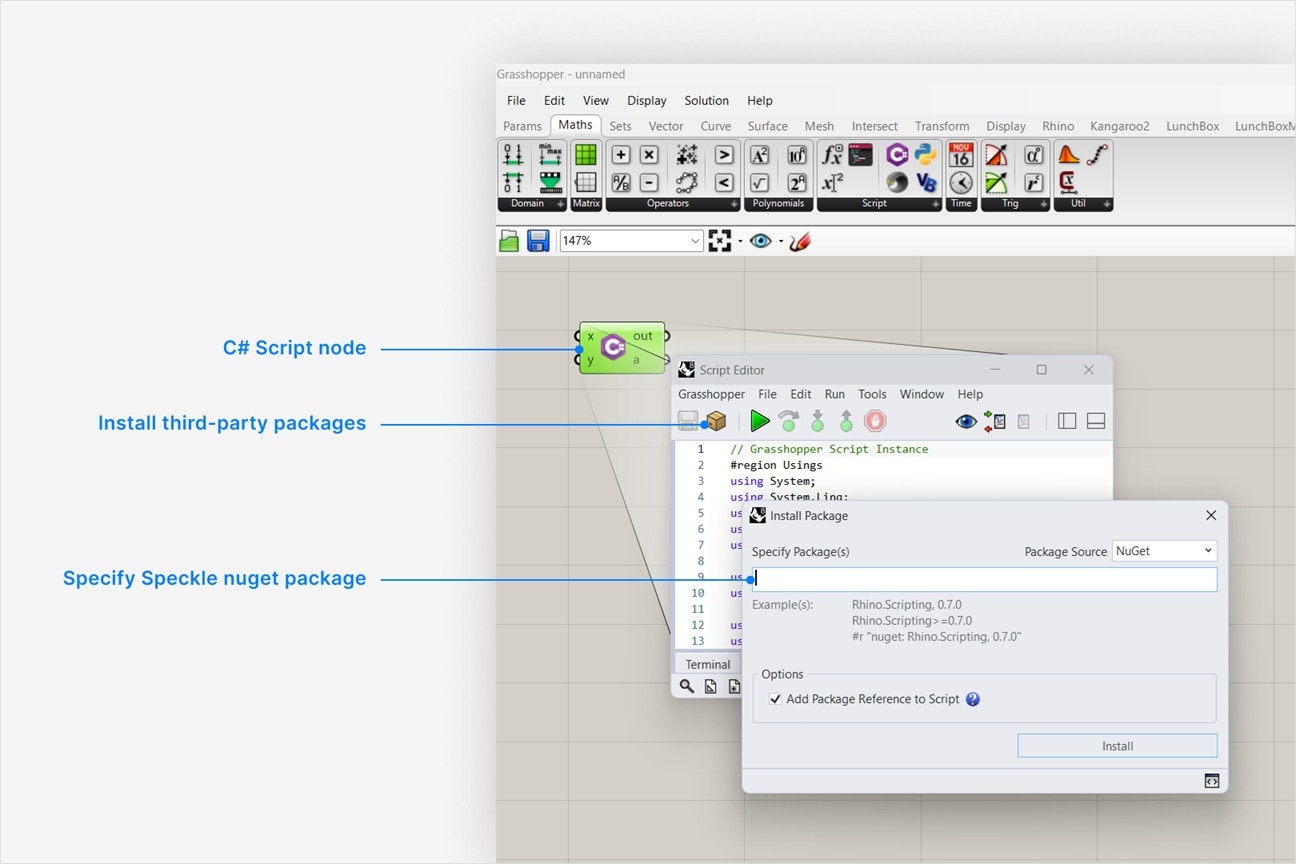
Install NuGet packages from the C# Script editor (**box icon** > **Specify Package(s)**). Copy the `#r` lines from the [Speckle.Sdk](https://www.nuget.org/packages/Speckle.Sdk) and [Speckle.Objects](https://www.nuget.org/packages/Speckle.Objects) **Script & Interactive** tabs (version numbers will match the latest release):
```csharp NuGet references lines icon="https://mintcdn.com/speckle/VtRPWzmN-ULoLfIv/images/developers/sdks/csharp.svg?fit=max&auto=format&n=VtRPWzmN-ULoLfIv&q=85&s=f2970e3b8bd4a2c7899b46211a42f251" theme={null}
// Grasshopper C# Script — NuGet references
#r "nuget: Speckle.Sdk, 3.21.1"
#r "nuget: Speckle.Objects, 3.21.1"
```
Paste a minimal bootstrap once per script. It registers the object model and gives you `Flatten` helpers plus optional `Serialize` — **no account or `IClientFactory` required** for the main exercise:
```csharp Bootstrap lines icon="https://mintcdn.com/speckle/VtRPWzmN-ULoLfIv/images/developers/sdks/csharp.svg?fit=max&auto=format&n=VtRPWzmN-ULoLfIv&q=85&s=f2970e3b8bd4a2c7899b46211a42f251" theme={null}
using Microsoft.Extensions.DependencyInjection;
using Speckle.Sdk;
using Speckle.Sdk.Api;
static class SpeckleBootstrap
{
static readonly ServiceProvider Provider = new ServiceCollection()
.AddSpeckleSdk(
new Application("GH Enrichment", "gh-enrichment"),
"1.0.0",
typeof(Speckle.Objects.Geometry.Point).Assembly
)
.BuildServiceProvider();
public static IOperations Operations => Provider.GetRequiredService();
}
```
The Grasshopper connector converts Rhino points the same way — see [`PointToSpeckleConverter.cs`](https://github.com/specklesystems/speckle-sharp-connectors/blob/main/Converters/Rhino/Speckle.Converters.RhinoShared/ToSpeckle/Raw/PointToSpeckleConverter.cs) in speckle-sharp-connectors.
## Grasshopper execution model
Grasshopper recomputes the script whenever upstream inputs change. Building a `Collection` of a few hundred `DataObject` instances is cheap — there is **no network call** in the main exercise.
On large lists, cache the `summary` string in a script field and only rebuild it when `pts` count changes, so preview panels stay responsive. The object graph itself should still rebuild each solve so outputs stay correct.
## Enrich a structural layout
**Worked example:** build a publish-ready structural data model from pier locations and grid lines. Inputs are geometry only; every Speckle property below is **computed**.
| Computed property | Derivation |
| -------------------- | ------------------------------------------------------------------------------ |
| `distanceFromOrigin` | `pt.DistanceTo(origin)` |
| `quadrant` | Sign of X and Y relative to origin |
| `bearing` | `Atan2` converted to degrees |
| `utilization` | Simplified demand / `capacity` (replace with upstream analysis when available) |
| `nearestGridLine` | Index of closest line in `gridLines` |
### Complete example
```csharp Complete example lines icon="https://mintcdn.com/speckle/VtRPWzmN-ULoLfIv/images/developers/sdks/csharp.svg?fit=max&auto=format&n=VtRPWzmN-ULoLfIv&q=85&s=f2970e3b8bd4a2c7899b46211a42f251" expandable theme={null}
// Grasshopper C# Script — structural layout enrichment
#r "nuget: Speckle.Sdk, 3.21.1"
#r "nuget: Speckle.Objects, 3.21.1"
using System;
using System.Collections.Generic;
using System.Linq;
using System.Text;
using Microsoft.Extensions.DependencyInjection;
using Rhino.Geometry;
using Speckle.Objects.Data;
using Speckle.Objects.Geometry;
using Speckle.Sdk;
using Speckle.Sdk.Api;
using Speckle.Sdk.Common;
using Speckle.Sdk.Models;
using Speckle.Sdk.Models.Collections;
using Speckle.Sdk.Models.Extensions;
static class SpeckleBootstrap
{
static readonly ServiceProvider Provider = new ServiceCollection()
.AddSpeckleSdk(
new Application("GH Enrichment", "gh-enrichment"),
"1.0.0",
typeof(Point).Assembly
)
.BuildServiceProvider();
public static IOperations Operations => Provider.GetRequiredService();
}
private void RunScript(
List pts,
List gridLines,
double capacity,
ref object elementCount,
ref object summary,
ref object status)
{
if (pts == null || pts.Count == 0)
{
status = "Provide at least one point.";
elementCount = 0;
summary = "";
return;
}
var origin = Point3d.Origin;
var dataObjects = pts.Select((pt, i) => BuildFooting(pt, i, origin, gridLines, capacity)).ToList();
var root = BuildRootByQuadrant(dataObjects);
var flat = root.Flatten().ToList();
elementCount = flat.Count;
summary = BuildSummary(dataObjects);
status = "OK";
}
static DataObject BuildFooting(Point3d pt, int index, Point3d origin, List gridLines, double capacity)
{
var dx = pt.X - origin.X;
var dy = pt.Y - origin.Y;
var distance = pt.DistanceTo(origin);
var bearing = Math.Round(Math.Atan2(dy, dx) * (180.0 / Math.PI), 1);
var demand = distance * 10.0; // stand-in; pipe real analysis from upstream when available
var utilization = capacity > 0 ? Math.Round(demand / capacity, 3) : 0;
var specklePoint = new Point(pt.X, pt.Y, pt.Z, Units.Meters);
return new DataObject
{
name = $"Footing {index + 1}",
properties = new Dictionary
{
["distanceFromOrigin"] = Math.Round(distance, 3),
["quadrant"] = Quadrant(dx, dy),
["bearing"] = bearing,
["utilization"] = utilization,
["nearestGridLine"] = NearestGridLineIndex(pt, gridLines),
},
displayValue = new List { specklePoint },
};
}
static Collection BuildRootByQuadrant(List footings)
{
var root = new Collection { name = "Structural layout" };
foreach (var group in footings.GroupBy(f => f.properties["quadrant"] as string ?? "Unknown"))
{
var quadrantCollection = new Collection { name = group.Key };
quadrantCollection.elements.AddRange(group.Cast());
root.elements.Add(quadrantCollection);
}
return root;
}
static string Quadrant(double dx, double dy)
{
if (dx >= 0 && dy >= 0) return "NE";
if (dx < 0 && dy >= 0) return "NW";
if (dx < 0 && dy < 0) return "SW";
return "SE";
}
static int NearestGridLineIndex(Point3d pt, List gridLines)
{
if (gridLines == null || gridLines.Count == 0) return -1;
return gridLines
.Select((line, i) => (i, line.DistanceTo(pt, true)))
.OrderBy(x => x.Item2)
.First().i;
}
static string BuildSummary(List footings)
{
var sb = new StringBuilder();
sb.AppendLine($"Footings: {footings.Count}");
sb.AppendLine($"Avg utilization: {footings.Average(f => (double)f.properties["utilization"]):F3}");
sb.AppendLine("By quadrant:");
foreach (var g in footings.GroupBy(f => f.properties["quadrant"]))
sb.AppendLine($" {g.Key}: {g.Count()}");
return sb.ToString();
}
```
Convert each Rhino `Point3d` to a Speckle `Point` and assign it to `DataObject.displayValue`. The viewer and connector expect renderable geometry here — the same field [Deconstruct](/connectors/grasshopper/grasshopper-developer) reads on a published param.
In the script, `BuildFooting` creates `specklePoint` and sets `displayValue = new List { specklePoint }`. Each footing `DataObject` now carries geometry the viewer can render.
Store BIM-like fields in `DataObject.properties`, not on the root `Base` indexer. Derive every field from point position, grid proximity, and `capacity` — that is the justification for code over passthrough nodes.
After this step, each footing has computed keys such as `distanceFromOrigin`, `quadrant`, `bearing`, `utilization`, and `nearestGridLine` in its `properties` dictionary.
Nest footings into child collections by computed `quadrant`. `Collection.elements` mirrors how [Create Collection](/connectors/grasshopper/grasshopper-collections) nodes organize a canvas — except the grouping rule runs in C#.
`BuildRootByQuadrant` returns a root `Collection` named `Structural layout` with one child collection per quadrant. The full graph is ready to traverse.
Call `root.Flatten()` to count every `Base` in the graph and wire `elementCount`. Build `summary` from aggregated computed fields. Optionally preview JSON:
```csharp Example lines icon="https://mintcdn.com/speckle/VtRPWzmN-ULoLfIv/images/developers/sdks/csharp.svg?fit=max&auto=format&n=VtRPWzmN-ULoLfIv&q=85&s=f2970e3b8bd4a2c7899b46211a42f251" theme={null}
string json = SpeckleBootstrap.Operations.Serialize(root);
```
Use this to sanity-check property names and nesting before exchange. See [Load and publish model data](/developers/sdks/dotnet/concepts/send-and-receive-paths#path-a-serialize-only).
When `status` reads `OK`, `elementCount` matches the flattened graph and `summary` reports footing counts and average utilization.
You now have a **publish-ready data model in memory**. Success means a correct `DataObject` / `Collection` graph and a trustworthy `summary`. When you are ready to **exchange** it, use **Publish** on the connector (normal workflow) or [Appendix A](#a-publish-the-same-graph-from-code) (programmatic). Do not rebuild the same graph with Collection nodes on the canvas.
The graph shape aligns with [`GrasshopperRootObjectBuilder`](https://github.com/specklesystems/speckle-sharp-connectors/blob/main/Connectors/Rhino/Speckle.Connectors.GrasshopperShared/Operations/Send/GrasshopperSendOperation.cs) — the same model Publish would pack. Connector wire casting uses [`SpeckleGeometryWrapperGoo.cs`](https://github.com/specklesystems/speckle-sharp-connectors/blob/main/Connectors/Rhino/Speckle.Connectors.GrasshopperShared/Parameters/Wrappers/SpeckleGeometryWrapperGoo.cs); Deconstruct reads the same fields via [`DeconstructSpeckleParam.cs`](https://github.com/specklesystems/speckle-sharp-connectors/blob/main/Connectors/Rhino/Speckle.Connectors.GrasshopperShared/Components/Dev/DeconstructSpeckleParam.cs).
## Extend the graph
**Nested collections by rule** — the example already groups by `quadrant`. Swap the `GroupBy` key for `nearestGridLine` or a utilization band to change hierarchy without new inputs.
**Line geometry between pairs** — add Speckle `Line` objects to `displayValue` or as sibling `DataObject` entries:
```csharp Example lines icon="https://mintcdn.com/speckle/VtRPWzmN-ULoLfIv/images/developers/sdks/csharp.svg?fit=max&auto=format&n=VtRPWzmN-ULoLfIv&q=85&s=f2970e3b8bd4a2c7899b46211a42f251" theme={null}
var link = new DataObject
{
name = "Brace",
displayValue = new List
{
new Line
{
start = new Point(a.X, a.Y, a.Z, Units.Meters),
end = new Point(b.X, b.Y, b.Z, Units.Meters),
units = Units.Meters,
},
},
};
```
**Area-like scalar from a bounding box** — for closed curves or breps, derive `floorArea` from `AreaMassProperties` and store it on `properties` the same way as `distanceFromOrigin`.
See [Working with Geometry](/developers/sdks/dotnet/guides/working-with-geometry) for mesh and unit details.
## How this relates to the Speckle Grasshopper connector
When connector nodes are enough, use them for transport and light edits. Speckle.Sdk in a C# Script is for graph-wide computation, derived per-element metadata, and nested collections from programmatic rules. **Deconstruct** inspects one param at a time; **Speckle.Sdk** constructs and analyses the whole graph; **Publish** exchanges it.
Both paths use the same object model (`DataObject`, `Collection`, `displayValue`). The connector casts native Grasshopper geometry through wrapper types; your script converts explicitly — same serialized shape on the wire.
Production connector code lives in [speckle-sharp-connectors](https://github.com/specklesystems/speckle-sharp-connectors) under `Speckle.Connectors.GrasshopperShared` and `Speckle.Converters.RhinoShared`.
## Common pitfalls
| Pitfall | Fix |
| ----------------------------------------------- | ------------------------------------------------------------------------------------------------------------ |
| Rebuilding the graph with nodes after scripting | Main arc ends at inspect; use Publish on existing wires or [Appendix A](#a-publish-the-same-graph-from-code) |
| Static sliders instead of computed properties | Derive metadata in code — that is the point of this guide |
| `properties` on wrong layer | Use `DataObject.properties` for BIM-like fields |
| Treating SDK as a Publish replacement | Transport = connector or appendix |
| Deconstruct vs `Flatten` | Deconstruct = one wire; SDK = whole graph |
| v2 `Speckle.Core` | v3 only — `Speckle.Sdk` + `Speckle.Objects` |
## Next Steps
DataObject, Collection, displayValue
Send2 when ready to publish
Send2 and Receive2 signatures
## Related documentation
Deconstruct and inspect published params
Passthrough geometry and static attributes
Canvas-side collection hierarchy
DataObject, Collection, Flatten
Send2 / Receive2 when you need transport from code
Publish and Load on the canvas
## Appendices
If you already built `root` in the script and need to send it without the Publish component, add account bootstrap and follow [Automate with scripts](/developers/sdks/dotnet/getting-started/scripts-and-notebooks):
```csharp Example lines icon="https://mintcdn.com/speckle/VtRPWzmN-ULoLfIv/images/developers/sdks/csharp.svg?fit=max&auto=format&n=VtRPWzmN-ULoLfIv&q=85&s=f2970e3b8bd4a2c7899b46211a42f251" theme={null}
var sendResult = await SpeckleBootstrap.Operations.Send2(
client.ServerUrl,
project.id,
account.token,
root,
onProgressAction: null,
cancellationToken: default
);
await client.Version.Create(
new CreateVersionInput(sendResult.RootId, model.id, project.id, "From Grasshopper script")
);
```
See [Load and publish model data](/developers/sdks/dotnet/concepts/send-and-receive-paths) and [Authentication](/developers/sdks/dotnet/getting-started/authentication) (Appendix C).
After **Load** on the connector, traverse received graphs with [Find objects by property](/developers/sdks/dotnet/guides/finding-and-extracting-data). Server access requires [Authentication](/developers/sdks/dotnet/getting-started/authentication).
PATs, environment variables, and desktop accounts: [Authentication](/developers/sdks/dotnet/getting-started/authentication). Only needed for appendices A and B — not for the main data-modelling exercise.
## Mission and when you need the SDK
Passthrough nodes move geometry and attach **static** attributes. They do not run graph-wide computation or build nested structures from rules. The use cases above cover when to reach for Speckle.Sdk in a C# Script.
The same workflow applies to room footprints (`floorArea`, `occupancy`, `carbonEstimate`, `qaStatus`) or any case where **per-element computed fields** do not scale on wires.
## Prerequisites
* Rhino 8 and a Grasshopper **C# Script** component (**Maths** > **Script**)
* Familiarity with [Developer Nodes](/connectors/grasshopper/grasshopper-developer) — especially **Deconstruct** for the inspect layer
* Awareness that **Publish** exists on the connector (exchange layer) — not required to complete this exercise
* [DataObject and Collection](/developers/sdks/dotnet/concepts/objects-and-traversal#dataobject-and-collection) — the containers this guide builds
## Set up the C# Script component
Add a C# Script to your canvas and declare these inputs and outputs. Geometry comes from Grasshopper; **Speckle-facing metadata is computed in the script**, not wired in as static lists.
| In / out | Type | Role |
| -------------- | --------------- | ---------------------------------------- |
| `pts` | `List` | Pier or footing locations |
| `gridLines` | `List` | Closest-line index for `nearestGridLine` |
| `capacity` | `double` | Denominator for `utilization` |
| `elementCount` | `int` | Count after `Flatten` |
| `summary` | `string` | Report of computed fields |
| `status` | `string` | Validation message |
Do not add `category` or `loads` as dumb inputs — those values are **derived** in code.
## Install packages and minimal bootstrap
Install NuGet packages from the C# Script editor (**box icon** > **Specify Package(s)**). Copy the `#r` lines from the [Speckle.Sdk](https://www.nuget.org/packages/Speckle.Sdk) and [Speckle.Objects](https://www.nuget.org/packages/Speckle.Objects) **Script & Interactive** tabs (version numbers will match the latest release):
```csharp NuGet references lines icon="https://mintcdn.com/speckle/VtRPWzmN-ULoLfIv/images/developers/sdks/csharp.svg?fit=max&auto=format&n=VtRPWzmN-ULoLfIv&q=85&s=f2970e3b8bd4a2c7899b46211a42f251" theme={null}
// Grasshopper C# Script — NuGet references
#r "nuget: Speckle.Sdk, 3.21.1"
#r "nuget: Speckle.Objects, 3.21.1"
```
Paste a minimal bootstrap once per script. It registers the object model and gives you `Flatten` helpers plus optional `Serialize` — **no account or `IClientFactory` required** for the main exercise:
```csharp Bootstrap lines icon="https://mintcdn.com/speckle/VtRPWzmN-ULoLfIv/images/developers/sdks/csharp.svg?fit=max&auto=format&n=VtRPWzmN-ULoLfIv&q=85&s=f2970e3b8bd4a2c7899b46211a42f251" theme={null}
using Microsoft.Extensions.DependencyInjection;
using Speckle.Sdk;
using Speckle.Sdk.Api;
static class SpeckleBootstrap
{
static readonly ServiceProvider Provider = new ServiceCollection()
.AddSpeckleSdk(
new Application("GH Enrichment", "gh-enrichment"),
"1.0.0",
typeof(Speckle.Objects.Geometry.Point).Assembly
)
.BuildServiceProvider();
public static IOperations Operations => Provider.GetRequiredService();
}
```
The Grasshopper connector converts Rhino points the same way — see [`PointToSpeckleConverter.cs`](https://github.com/specklesystems/speckle-sharp-connectors/blob/main/Converters/Rhino/Speckle.Converters.RhinoShared/ToSpeckle/Raw/PointToSpeckleConverter.cs) in speckle-sharp-connectors.
## Grasshopper execution model
Grasshopper recomputes the script whenever upstream inputs change. Building a `Collection` of a few hundred `DataObject` instances is cheap — there is **no network call** in the main exercise.
On large lists, cache the `summary` string in a script field and only rebuild it when `pts` count changes, so preview panels stay responsive. The object graph itself should still rebuild each solve so outputs stay correct.
## Enrich a structural layout
**Worked example:** build a publish-ready structural data model from pier locations and grid lines. Inputs are geometry only; every Speckle property below is **computed**.
| Computed property | Derivation |
| -------------------- | ------------------------------------------------------------------------------ |
| `distanceFromOrigin` | `pt.DistanceTo(origin)` |
| `quadrant` | Sign of X and Y relative to origin |
| `bearing` | `Atan2` converted to degrees |
| `utilization` | Simplified demand / `capacity` (replace with upstream analysis when available) |
| `nearestGridLine` | Index of closest line in `gridLines` |
### Complete example
```csharp Complete example lines icon="https://mintcdn.com/speckle/VtRPWzmN-ULoLfIv/images/developers/sdks/csharp.svg?fit=max&auto=format&n=VtRPWzmN-ULoLfIv&q=85&s=f2970e3b8bd4a2c7899b46211a42f251" expandable theme={null}
// Grasshopper C# Script — structural layout enrichment
#r "nuget: Speckle.Sdk, 3.21.1"
#r "nuget: Speckle.Objects, 3.21.1"
using System;
using System.Collections.Generic;
using System.Linq;
using System.Text;
using Microsoft.Extensions.DependencyInjection;
using Rhino.Geometry;
using Speckle.Objects.Data;
using Speckle.Objects.Geometry;
using Speckle.Sdk;
using Speckle.Sdk.Api;
using Speckle.Sdk.Common;
using Speckle.Sdk.Models;
using Speckle.Sdk.Models.Collections;
using Speckle.Sdk.Models.Extensions;
static class SpeckleBootstrap
{
static readonly ServiceProvider Provider = new ServiceCollection()
.AddSpeckleSdk(
new Application("GH Enrichment", "gh-enrichment"),
"1.0.0",
typeof(Point).Assembly
)
.BuildServiceProvider();
public static IOperations Operations => Provider.GetRequiredService();
}
private void RunScript(
List pts,
List gridLines,
double capacity,
ref object elementCount,
ref object summary,
ref object status)
{
if (pts == null || pts.Count == 0)
{
status = "Provide at least one point.";
elementCount = 0;
summary = "";
return;
}
var origin = Point3d.Origin;
var dataObjects = pts.Select((pt, i) => BuildFooting(pt, i, origin, gridLines, capacity)).ToList();
var root = BuildRootByQuadrant(dataObjects);
var flat = root.Flatten().ToList();
elementCount = flat.Count;
summary = BuildSummary(dataObjects);
status = "OK";
}
static DataObject BuildFooting(Point3d pt, int index, Point3d origin, List gridLines, double capacity)
{
var dx = pt.X - origin.X;
var dy = pt.Y - origin.Y;
var distance = pt.DistanceTo(origin);
var bearing = Math.Round(Math.Atan2(dy, dx) * (180.0 / Math.PI), 1);
var demand = distance * 10.0; // stand-in; pipe real analysis from upstream when available
var utilization = capacity > 0 ? Math.Round(demand / capacity, 3) : 0;
var specklePoint = new Point(pt.X, pt.Y, pt.Z, Units.Meters);
return new DataObject
{
name = $"Footing {index + 1}",
properties = new Dictionary
{
["distanceFromOrigin"] = Math.Round(distance, 3),
["quadrant"] = Quadrant(dx, dy),
["bearing"] = bearing,
["utilization"] = utilization,
["nearestGridLine"] = NearestGridLineIndex(pt, gridLines),
},
displayValue = new List { specklePoint },
};
}
static Collection BuildRootByQuadrant(List footings)
{
var root = new Collection { name = "Structural layout" };
foreach (var group in footings.GroupBy(f => f.properties["quadrant"] as string ?? "Unknown"))
{
var quadrantCollection = new Collection { name = group.Key };
quadrantCollection.elements.AddRange(group.Cast());
root.elements.Add(quadrantCollection);
}
return root;
}
static string Quadrant(double dx, double dy)
{
if (dx >= 0 && dy >= 0) return "NE";
if (dx < 0 && dy >= 0) return "NW";
if (dx < 0 && dy < 0) return "SW";
return "SE";
}
static int NearestGridLineIndex(Point3d pt, List gridLines)
{
if (gridLines == null || gridLines.Count == 0) return -1;
return gridLines
.Select((line, i) => (i, line.DistanceTo(pt, true)))
.OrderBy(x => x.Item2)
.First().i;
}
static string BuildSummary(List footings)
{
var sb = new StringBuilder();
sb.AppendLine($"Footings: {footings.Count}");
sb.AppendLine($"Avg utilization: {footings.Average(f => (double)f.properties["utilization"]):F3}");
sb.AppendLine("By quadrant:");
foreach (var g in footings.GroupBy(f => f.properties["quadrant"]))
sb.AppendLine($" {g.Key}: {g.Count()}");
return sb.ToString();
}
```
Convert each Rhino `Point3d` to a Speckle `Point` and assign it to `DataObject.displayValue`. The viewer and connector expect renderable geometry here — the same field [Deconstruct](/connectors/grasshopper/grasshopper-developer) reads on a published param.
In the script, `BuildFooting` creates `specklePoint` and sets `displayValue = new List { specklePoint }`. Each footing `DataObject` now carries geometry the viewer can render.
Store BIM-like fields in `DataObject.properties`, not on the root `Base` indexer. Derive every field from point position, grid proximity, and `capacity` — that is the justification for code over passthrough nodes.
After this step, each footing has computed keys such as `distanceFromOrigin`, `quadrant`, `bearing`, `utilization`, and `nearestGridLine` in its `properties` dictionary.
Nest footings into child collections by computed `quadrant`. `Collection.elements` mirrors how [Create Collection](/connectors/grasshopper/grasshopper-collections) nodes organize a canvas — except the grouping rule runs in C#.
`BuildRootByQuadrant` returns a root `Collection` named `Structural layout` with one child collection per quadrant. The full graph is ready to traverse.
Call `root.Flatten()` to count every `Base` in the graph and wire `elementCount`. Build `summary` from aggregated computed fields. Optionally preview JSON:
```csharp Example lines icon="https://mintcdn.com/speckle/VtRPWzmN-ULoLfIv/images/developers/sdks/csharp.svg?fit=max&auto=format&n=VtRPWzmN-ULoLfIv&q=85&s=f2970e3b8bd4a2c7899b46211a42f251" theme={null}
string json = SpeckleBootstrap.Operations.Serialize(root);
```
Use this to sanity-check property names and nesting before exchange. See [Load and publish model data](/developers/sdks/dotnet/concepts/send-and-receive-paths#path-a-serialize-only).
When `status` reads `OK`, `elementCount` matches the flattened graph and `summary` reports footing counts and average utilization.
You now have a **publish-ready data model in memory**. Success means a correct `DataObject` / `Collection` graph and a trustworthy `summary`. When you are ready to **exchange** it, use **Publish** on the connector (normal workflow) or [Appendix A](#a-publish-the-same-graph-from-code) (programmatic). Do not rebuild the same graph with Collection nodes on the canvas.
The graph shape aligns with [`GrasshopperRootObjectBuilder`](https://github.com/specklesystems/speckle-sharp-connectors/blob/main/Connectors/Rhino/Speckle.Connectors.GrasshopperShared/Operations/Send/GrasshopperSendOperation.cs) — the same model Publish would pack. Connector wire casting uses [`SpeckleGeometryWrapperGoo.cs`](https://github.com/specklesystems/speckle-sharp-connectors/blob/main/Connectors/Rhino/Speckle.Connectors.GrasshopperShared/Parameters/Wrappers/SpeckleGeometryWrapperGoo.cs); Deconstruct reads the same fields via [`DeconstructSpeckleParam.cs`](https://github.com/specklesystems/speckle-sharp-connectors/blob/main/Connectors/Rhino/Speckle.Connectors.GrasshopperShared/Components/Dev/DeconstructSpeckleParam.cs).
## Extend the graph
**Nested collections by rule** — the example already groups by `quadrant`. Swap the `GroupBy` key for `nearestGridLine` or a utilization band to change hierarchy without new inputs.
**Line geometry between pairs** — add Speckle `Line` objects to `displayValue` or as sibling `DataObject` entries:
```csharp Example lines icon="https://mintcdn.com/speckle/VtRPWzmN-ULoLfIv/images/developers/sdks/csharp.svg?fit=max&auto=format&n=VtRPWzmN-ULoLfIv&q=85&s=f2970e3b8bd4a2c7899b46211a42f251" theme={null}
var link = new DataObject
{
name = "Brace",
displayValue = new List
{
new Line
{
start = new Point(a.X, a.Y, a.Z, Units.Meters),
end = new Point(b.X, b.Y, b.Z, Units.Meters),
units = Units.Meters,
},
},
};
```
**Area-like scalar from a bounding box** — for closed curves or breps, derive `floorArea` from `AreaMassProperties` and store it on `properties` the same way as `distanceFromOrigin`.
See [Working with Geometry](/developers/sdks/dotnet/guides/working-with-geometry) for mesh and unit details.
## How this relates to the Speckle Grasshopper connector
When connector nodes are enough, use them for transport and light edits. Speckle.Sdk in a C# Script is for graph-wide computation, derived per-element metadata, and nested collections from programmatic rules. **Deconstruct** inspects one param at a time; **Speckle.Sdk** constructs and analyses the whole graph; **Publish** exchanges it.
Both paths use the same object model (`DataObject`, `Collection`, `displayValue`). The connector casts native Grasshopper geometry through wrapper types; your script converts explicitly — same serialized shape on the wire.
Production connector code lives in [speckle-sharp-connectors](https://github.com/specklesystems/speckle-sharp-connectors) under `Speckle.Connectors.GrasshopperShared` and `Speckle.Converters.RhinoShared`.
## Common pitfalls
| Pitfall | Fix |
| ----------------------------------------------- | ------------------------------------------------------------------------------------------------------------ |
| Rebuilding the graph with nodes after scripting | Main arc ends at inspect; use Publish on existing wires or [Appendix A](#a-publish-the-same-graph-from-code) |
| Static sliders instead of computed properties | Derive metadata in code — that is the point of this guide |
| `properties` on wrong layer | Use `DataObject.properties` for BIM-like fields |
| Treating SDK as a Publish replacement | Transport = connector or appendix |
| Deconstruct vs `Flatten` | Deconstruct = one wire; SDK = whole graph |
| v2 `Speckle.Core` | v3 only — `Speckle.Sdk` + `Speckle.Objects` |
## Next Steps
DataObject, Collection, displayValue
Send2 when ready to publish
Send2 and Receive2 signatures
## Related documentation
Deconstruct and inspect published params
Passthrough geometry and static attributes
Canvas-side collection hierarchy
DataObject, Collection, Flatten
Send2 / Receive2 when you need transport from code
Publish and Load on the canvas
## Appendices
If you already built `root` in the script and need to send it without the Publish component, add account bootstrap and follow [Automate with scripts](/developers/sdks/dotnet/getting-started/scripts-and-notebooks):
```csharp Example lines icon="https://mintcdn.com/speckle/VtRPWzmN-ULoLfIv/images/developers/sdks/csharp.svg?fit=max&auto=format&n=VtRPWzmN-ULoLfIv&q=85&s=f2970e3b8bd4a2c7899b46211a42f251" theme={null}
var sendResult = await SpeckleBootstrap.Operations.Send2(
client.ServerUrl,
project.id,
account.token,
root,
onProgressAction: null,
cancellationToken: default
);
await client.Version.Create(
new CreateVersionInput(sendResult.RootId, model.id, project.id, "From Grasshopper script")
);
```
See [Load and publish model data](/developers/sdks/dotnet/concepts/send-and-receive-paths) and [Authentication](/developers/sdks/dotnet/getting-started/authentication) (Appendix C).
After **Load** on the connector, traverse received graphs with [Find objects by property](/developers/sdks/dotnet/guides/finding-and-extracting-data). Server access requires [Authentication](/developers/sdks/dotnet/getting-started/authentication).
PATs, environment variables, and desktop accounts: [Authentication](/developers/sdks/dotnet/getting-started/authentication). Only needed for appendices A and B — not for the main data-modelling exercise.