> ## Documentation Index
> Fetch the complete documentation index at: https://docs.speckle.systems/llms.txt
> Use this file to discover all available pages before exploring further.
# 3D Viewer
> Introduction to the Speckle Viewer architecture built on three.js. Learn about viewer-core features like automatic batching, BVH acceleration, and instanced rendering, plus the extensible extension system for custom functionality.
The speckle viewer is developed on top of [three.js](https://threejs.org/) and for the most part it behaves like a typical three.js application. However, Speckle viewer builds custom functionality on top of three.js when it comes to loading and storing data, object interpretation, scenegraph structure, and rendering.
The Viewer library is organized into `viewer-core` and `extensions`.
## Viewer-core
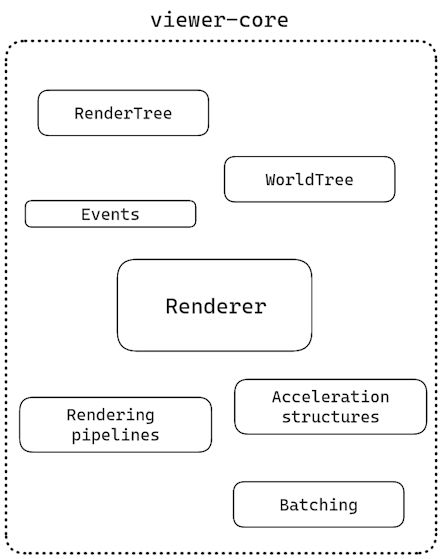 The `viewer-core` has it's own API and can be used as a standalone to develop applications. If all you want is a barebone web viewer, the viewer core is what you are looking for. Some of the features you'll be getting are:
* Automatic object batching
* Relative to eye rendering
* Multi level [BVH](https://en.wikipedia.org/wiki/Bounding_volume_hierarchy)s
* Automatic [instanced rendering](https://en.wikipedia.org/wiki/Geometry_instancing)
* Progressive [ambient occlusion](https://en.wikipedia.org/wiki/Ambient_occlusion)
* Shadowcatcher
## Extensions
In order to better customize the viewer functionality and behavior we've added support for extensions. A lot of explicit viewer functionality is provided via such extensions
The `viewer-core` has it's own API and can be used as a standalone to develop applications. If all you want is a barebone web viewer, the viewer core is what you are looking for. Some of the features you'll be getting are:
* Automatic object batching
* Relative to eye rendering
* Multi level [BVH](https://en.wikipedia.org/wiki/Bounding_volume_hierarchy)s
* Automatic [instanced rendering](https://en.wikipedia.org/wiki/Geometry_instancing)
* Progressive [ambient occlusion](https://en.wikipedia.org/wiki/Ambient_occlusion)
* Shadowcatcher
## Extensions
In order to better customize the viewer functionality and behavior we've added support for extensions. A lot of explicit viewer functionality is provided via such extensions
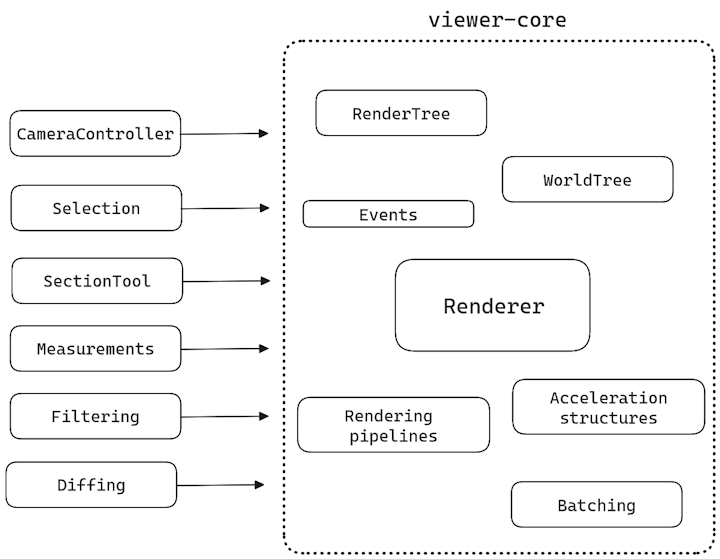 Extensions are a way in which you can easily drop in additional functionality to your viewer instance. If the default behavior or functionality of an extension does not exactly fit your needs, you can easily extend on it and change the way it works.
Probably the most important aspect with extensions, is that you can develop your own! More details on this topic will follow in a dedicated chapter.
Extensions are a way in which you can easily drop in additional functionality to your viewer instance. If the default behavior or functionality of an extension does not exactly fit your needs, you can easily extend on it and change the way it works.
Probably the most important aspect with extensions, is that you can develop your own! More details on this topic will follow in a dedicated chapter.