> ## Documentation Index
> Fetch the complete documentation index at: https://docs.speckle.systems/llms.txt
> Use this file to discover all available pages before exploring further.
# Data Tree
The speckle viewer organizes input data into data structures respecting the original hierarchical relations between objects with the purpose of offering functionality for reading, searching and working with the said data.
## World Tree
The viewer stores data in a hierarchical fashion inside a tree-like structure which we call [*WorldTree*](/developers/viewer/world-tree-api#worldtree)
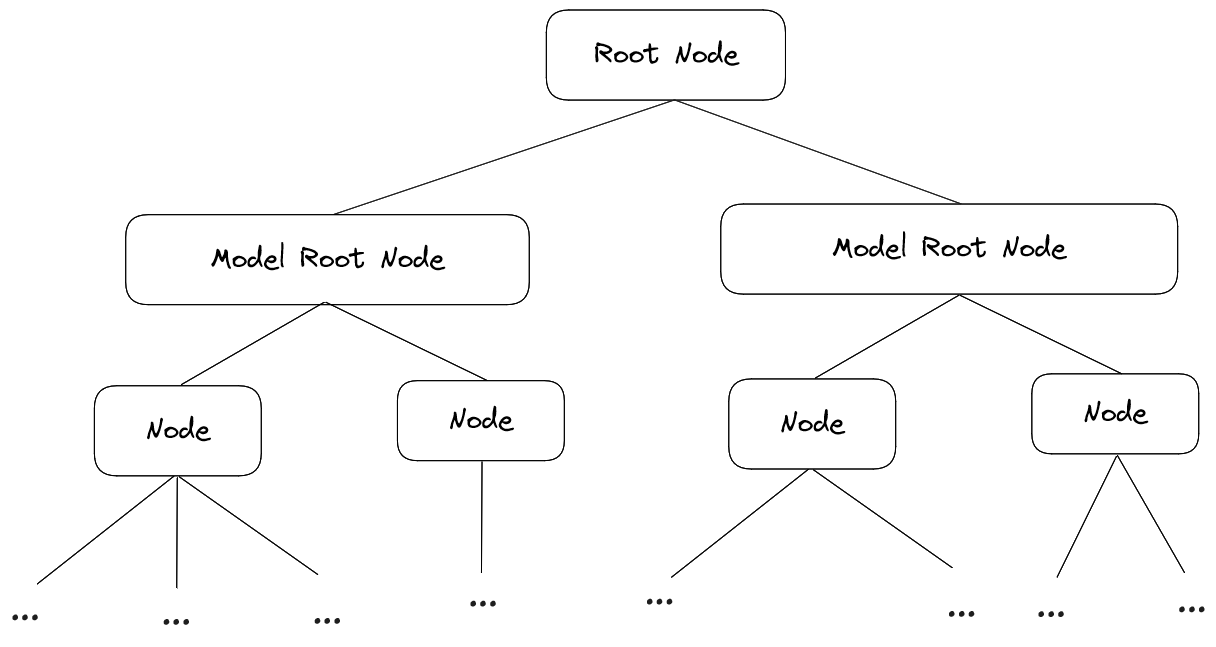 A node inside the tree looks like the following:
```typescript theme={null}
{
model: NodeData;
children: Array;
parent: TreeNode;
}
```
And the `NodeData` model payload of a Node:
```typescript theme={null}
{
raw: { [prop: string]: any }
children: TreeNode[]
atomic: boolean
subtreeId?: number
renderView?: NodeRenderView
instanced?: boolean
}
```
Each node will store any `raw` data that came in via the loader. In the SpeckleLoder's case it's the actual speckle object. The `atomic` property hints at whether we need to treat this node as a complete object (true) or just being part of another object (false). `subtreeId` is just an internally used property for search acceleration, and `instanced` tells if this node data is being used by multiple nodes. The `renderView` property is a very important property which holds the data required for everything rendering related. We will describe it in detail later on.
The `WorldTree` class provides functionality for adding, removing ,searching and walking the tree. It is the single source of truth for all the data in the viewer and it's the place to go for all data related operations.
### Working with Nodes
The TreeNodes in the WorldTree are nothing else than the objects you loaded in. So at some point, you want to interact with your objects on one level or another. Typically, there are two ways to get hold of nodes.
#### ID-based:
```typescript theme={null}
const nodes = viewer.getWorldTree().findId('6ddd42ca007461a3a33375b193bdf9b0');
```
`findId` returns an array rather than a single node. That's because the speckle viewer does not assume a 1:1 relationship between an *id* and a *node*/*object*. A good example for this is *instances*: when provided with the id of an instance, `findId` will return *all* the instance nodes. Outside of this scenario, `findId` will return an array of one node.
A more specific way of using `findId` is
```typescript theme={null}
const subtreeId = 1;
const nodes = viewer
.getWorldTree()
.findId('6ddd42ca007461a3a33375b193bdf9b0', subtreeId);
```
When providing a `subtreeId`, only that subtree will be searched. To disambiguate the term *subtree*: Each time you load something via `loadObject` that data will be stored in it's own *subtree* with a unique id. Specifying an explicit subtreeId comes in handy in scenarios where you have multiple loaded resources, with identical objects between them, for example several versions of the same model.
For best performance using `findId` over other search methods is recommended.
It's the fastest method for searching for nodes because it's backed up by maps
#### Generic:
Due to lack of better wording, this is basically any object query you'd do that does not imply specific object ids. So for example you'd want to get nodes which satisfy a specific condition:
```typescript theme={null}
const nodes = viewer.getWorldTree().findAll((node: TreeNode) => {
if() return true
})
```
Another alternative would be to walk the tree either synchronously:
```typescript World Tree Walk theme={null}
viewer.getWorldTree().walk((node: TreeNode) => {
// do whatever is needed
return true;
});
```
Or asynchronously:
```typescript theme={null}
await viewer.getWorldTree().walkAsync((node: TreeNode) => {
// do whatever is needed
return true;
});
```
Returning `false` from the predicate of either `walk` or `walkAsync` will stop the walking immediately
Be mindfull of what you execute inside the predicates for
[*findAll*](/developers/viewer/world-tree-api#findall),
[*walk*](/developers/viewer/world-tree-api#walk) and
[*walkAsync*](/developers/viewer/world-tree-api#walkasync) since it can easily amount
to long execution times on large trees. For further details please refer to
their linked API references.
A node inside the tree looks like the following:
```typescript theme={null}
{
model: NodeData;
children: Array;
parent: TreeNode;
}
```
And the `NodeData` model payload of a Node:
```typescript theme={null}
{
raw: { [prop: string]: any }
children: TreeNode[]
atomic: boolean
subtreeId?: number
renderView?: NodeRenderView
instanced?: boolean
}
```
Each node will store any `raw` data that came in via the loader. In the SpeckleLoder's case it's the actual speckle object. The `atomic` property hints at whether we need to treat this node as a complete object (true) or just being part of another object (false). `subtreeId` is just an internally used property for search acceleration, and `instanced` tells if this node data is being used by multiple nodes. The `renderView` property is a very important property which holds the data required for everything rendering related. We will describe it in detail later on.
The `WorldTree` class provides functionality for adding, removing ,searching and walking the tree. It is the single source of truth for all the data in the viewer and it's the place to go for all data related operations.
### Working with Nodes
The TreeNodes in the WorldTree are nothing else than the objects you loaded in. So at some point, you want to interact with your objects on one level or another. Typically, there are two ways to get hold of nodes.
#### ID-based:
```typescript theme={null}
const nodes = viewer.getWorldTree().findId('6ddd42ca007461a3a33375b193bdf9b0');
```
`findId` returns an array rather than a single node. That's because the speckle viewer does not assume a 1:1 relationship between an *id* and a *node*/*object*. A good example for this is *instances*: when provided with the id of an instance, `findId` will return *all* the instance nodes. Outside of this scenario, `findId` will return an array of one node.
A more specific way of using `findId` is
```typescript theme={null}
const subtreeId = 1;
const nodes = viewer
.getWorldTree()
.findId('6ddd42ca007461a3a33375b193bdf9b0', subtreeId);
```
When providing a `subtreeId`, only that subtree will be searched. To disambiguate the term *subtree*: Each time you load something via `loadObject` that data will be stored in it's own *subtree* with a unique id. Specifying an explicit subtreeId comes in handy in scenarios where you have multiple loaded resources, with identical objects between them, for example several versions of the same model.
For best performance using `findId` over other search methods is recommended.
It's the fastest method for searching for nodes because it's backed up by maps
#### Generic:
Due to lack of better wording, this is basically any object query you'd do that does not imply specific object ids. So for example you'd want to get nodes which satisfy a specific condition:
```typescript theme={null}
const nodes = viewer.getWorldTree().findAll((node: TreeNode) => {
if() return true
})
```
Another alternative would be to walk the tree either synchronously:
```typescript World Tree Walk theme={null}
viewer.getWorldTree().walk((node: TreeNode) => {
// do whatever is needed
return true;
});
```
Or asynchronously:
```typescript theme={null}
await viewer.getWorldTree().walkAsync((node: TreeNode) => {
// do whatever is needed
return true;
});
```
Returning `false` from the predicate of either `walk` or `walkAsync` will stop the walking immediately
Be mindfull of what you execute inside the predicates for
[*findAll*](/developers/viewer/world-tree-api#findall),
[*walk*](/developers/viewer/world-tree-api#walk) and
[*walkAsync*](/developers/viewer/world-tree-api#walkasync) since it can easily amount
to long execution times on large trees. For further details please refer to
their linked API references.