> ## Documentation Index
> Fetch the complete documentation index at: https://docs.speckle.systems/llms.txt
> Use this file to discover all available pages before exploring further.
> ## Agent Instructions
> These docs describe Speckle as it works today, including everything released in 2026.9. Treat page content as current unless the page or section says it applies only to versions published before 2026.9.
> Content scoped to versions published before 2026.9 (the object graph and root object, Proxies, Receive2, operations.receive, object.children) applies only to model versions in that earlier data format. For versions published in 2026.9, answer from the Object model pages and the SDK migration guides.
> The What's new pages summarise what changed in 2026.9 and link to the page that documents each change. Answer from the linked page rather than from the summary. Legacy (v2) connectors are retired; send questions about them to the community help forum.
> Match guidance to the customer's deployment, model data format, connector, plan and permissions. Self-hosted servers on a release before 2026.9 and compatibility-mode workflows follow the Compatibility mode page. If an unknown version or data format changes the answer, ask one focused question; do not infer the deployment version from the date alone.
# What's new in 2026.9 for workspace users
> New features and changes in Speckle 2026.9 for people who publish, view, and analyze models, and what to do before 1 November 2026.
Your day-to-day work stays the same: you publish and load through connectors, and the models you
already published stay readable. Speckle 2026.9 introduced a new data format for models, along with
the features and changes below. The connector upgrade window and compatibility mode both end on
**1 November 2026**, so check **Action required** first. Each item links to the page that
documents it. If you build on Speckle or manage it for your organisation, see What's new [for
developers](/whats-new/developers) and [for IT admins](/whats-new/it-admins).
## New
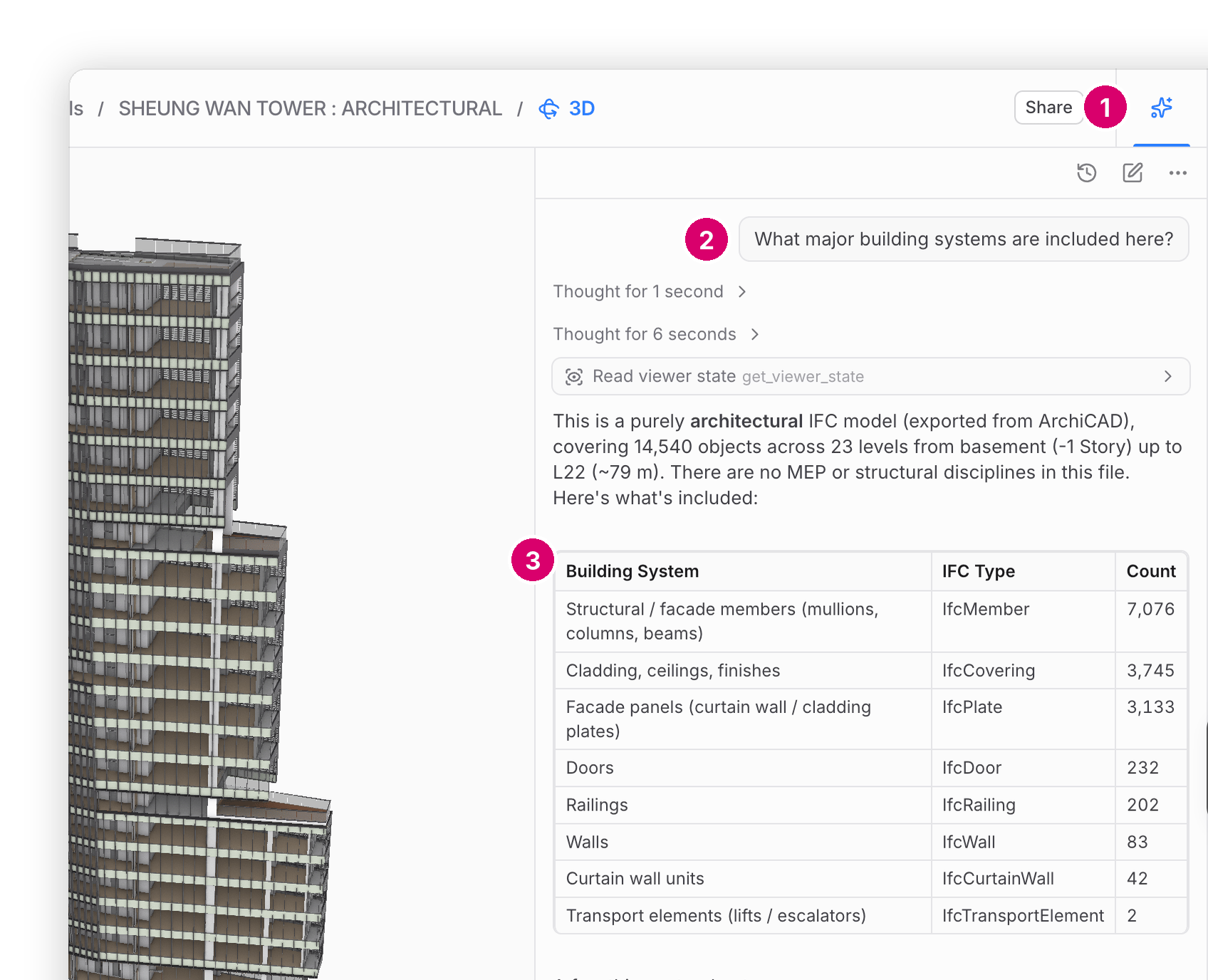
* **Speckle Intelligence Chat.** Ask questions about your models in plain language from **Chat**
in the project sidebar, or from the sparkle in the 3D viewer. It reads properties and how objects
relate, such as which level a wall is on. It reads versions in the new data format only. See [Ask questions about your
models](/analytics/intelligence).
 * **Intelligence Reports.** Chat can save its answer as a Report under **Reports** in the project
sidebar, where you edit and share it. See [Intelligence Reports](/analytics/reports).
* **Intelligence skills.** Save a reusable playbook, such as a colour legend or a costing method,
then call it in Chat with `/skill-name`. See [Intelligence skills](/analytics/intelligence-skills).
* **AI Rules.** Workspace admins set standing instructions that Speckle Intelligence follows in
every conversation. See [AI Rules](/analytics/intelligence-rules).
* **Trimble Connect sync (beta).** Each new file version in Trimble Connect becomes a new version of
a Speckle model. Available on the **Enterprise** plan. See [Sync models from Trimble
Connect](/connectors/cloud-integrations/trimble-connect).
* **Workspace usage.** Workspace admins see activity, plan limits, and AI spend under workspace
**Settings → Usage**. See [Usage](/workspaces/usage).
* **More upload formats.** Upload MicroStation (`.dgn`), Vectorworks (`.vwx`), and Solibri (`.smc`)
files, and Tekla Structures files where enabled. See [Direct
uploads](/connectors/direct-uploads/introduction).
## Changed
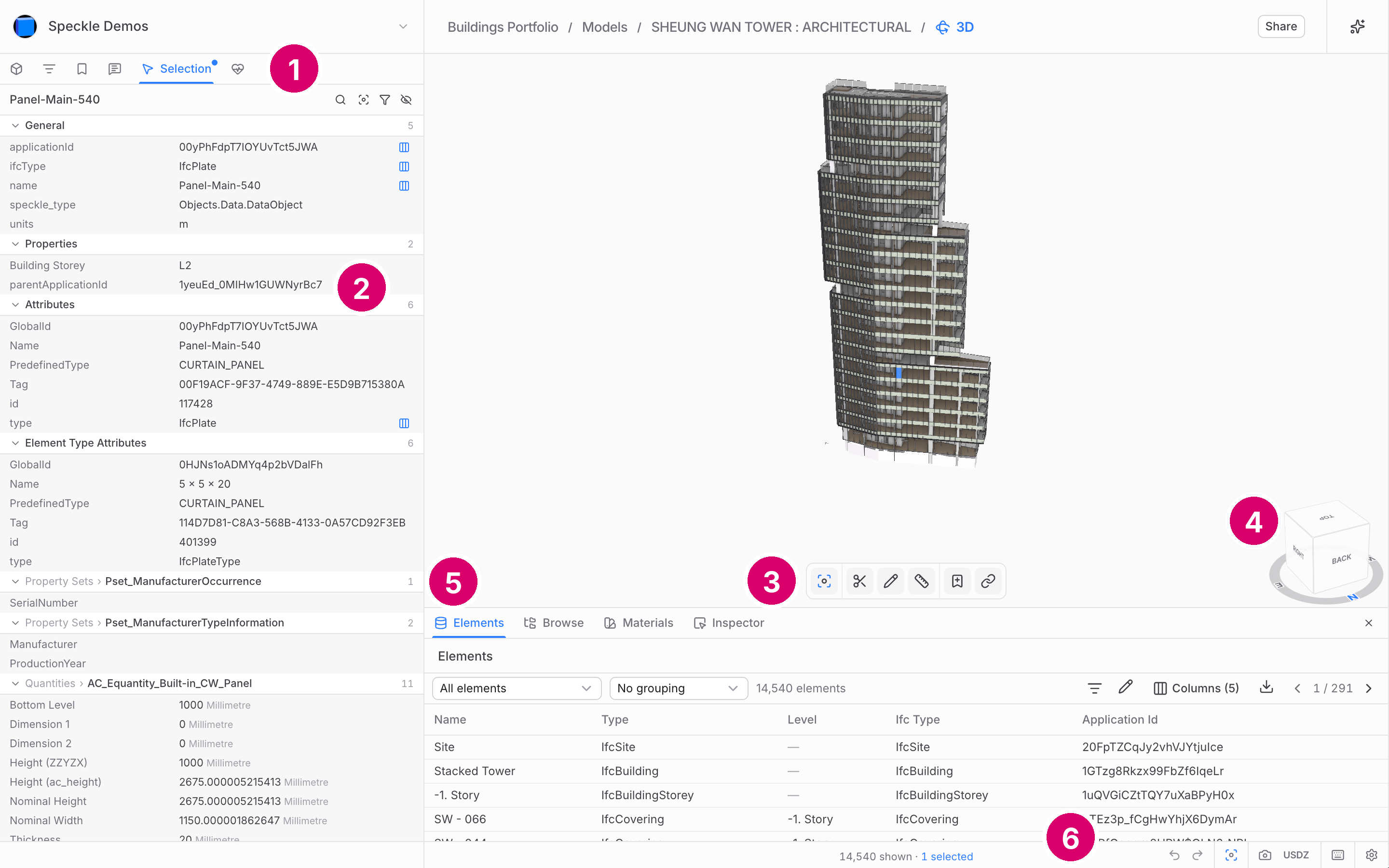
* **3D viewer layout.** Panels dock and regroup: **Models**, **Filters**, **Views**, and **Issues**
sit in the left sidebar, **Selection** shows properties, and **Elements** lists objects in a table
you can export to Excel. In **Models**, **Group by…** reorganises the model tree by a property.
Section planes replace the section box, **Sketch** replaces markups, and there are no view modes,
lighting, or explode. See [3D viewer](/3d-viewer/introduction).
* **Intelligence Reports.** Chat can save its answer as a Report under **Reports** in the project
sidebar, where you edit and share it. See [Intelligence Reports](/analytics/reports).
* **Intelligence skills.** Save a reusable playbook, such as a colour legend or a costing method,
then call it in Chat with `/skill-name`. See [Intelligence skills](/analytics/intelligence-skills).
* **AI Rules.** Workspace admins set standing instructions that Speckle Intelligence follows in
every conversation. See [AI Rules](/analytics/intelligence-rules).
* **Trimble Connect sync (beta).** Each new file version in Trimble Connect becomes a new version of
a Speckle model. Available on the **Enterprise** plan. See [Sync models from Trimble
Connect](/connectors/cloud-integrations/trimble-connect).
* **Workspace usage.** Workspace admins see activity, plan limits, and AI spend under workspace
**Settings → Usage**. See [Usage](/workspaces/usage).
* **More upload formats.** Upload MicroStation (`.dgn`), Vectorworks (`.vwx`), and Solibri (`.smc`)
files, and Tekla Structures files where enabled. See [Direct
uploads](/connectors/direct-uploads/introduction).
## Changed
* **3D viewer layout.** Panels dock and regroup: **Models**, **Filters**, **Views**, and **Issues**
sit in the left sidebar, **Selection** shows properties, and **Elements** lists objects in a table
you can export to Excel. In **Models**, **Group by…** reorganises the model tree by a property.
Section planes replace the section box, **Sketch** replaces markups, and there are no view modes,
lighting, or explode. See [3D viewer](/3d-viewer/introduction).
 * **3D viewer limitations.** Point clouds are not drawn yet, some colours and materials show as
grey, and embedded models show only the 3D scene. Your data is unchanged. See [3D
viewer](/3d-viewer/introduction).
* **Browser requirement.** The 3D viewer needs WebGPU. Models do not open in Firefox on macOS; use
Chrome, Edge, or Safari. See [3D viewer](/3d-viewer/introduction).
* **Compare versions.** The version diff view is no longer in the web app. Ask Speckle Intelligence what changed between two versions in the new data format.
See [Assess model
changes](/workflows/assess-model-changes).
* **Workspace sidebar.** The sidebar lists **Home**, **Projects**, **Intelligence** (dashboards),
**Documents** when enabled, **Team**, and **Settings**. Open your user settings by selecting your
name in the workspace switcher. See [Workspaces](/workspaces/introduction).
* **Workspace settings.** **General** holds the **AI features** switch, Settings adds
**Usage**, and an **AI** section holds **Rules** and **Skills**. See [Workspace configuration](/workspaces/configuration).
* **Dashboards.** Dashboards load models in the 2026.9 data format. A few older widgets are retired
or replaced: a saved one shows a card in its place, or cannot be added to new dashboards. See
[Retired and replaced dashboard widgets](/analytics/dashboards-widget-availability).
* **Parameter updates.** Edit parameters in bulk from the **Elements** table in the 3D viewer, then
apply them in Revit, Rhino, or Civil 3D through Issues. See [Parameter
Updater](/beta/parameter-updater).
* **Data Validation.** Project standards are not available; author and save checks instead. New
checks start with an empty scope and can test related objects. See [Data
Validation](/analytics/data-validation/overview).
* **Connectors.** New publishes from an updated connector use the 2026.9 data format. Connectors
from 2026.8 and earlier cannot load those versions, and Vectorworks cannot load them yet. See
[Connectors](/connectors/overview).
* **File uploads.** The default upload path no longer accepts STL, 3MF, 3DS, AMF, DXF, X, E57,
IGS/IGES, FBX, PLY, or SLDPRT files. They upload only in compatibility mode. See [Direct
uploads](/connectors/direct-uploads/introduction).
* **Revit.** Published geometry stays in Revit's internal coordinates, and the chosen **Reference
Point** is stored as a model placement that the viewer and connectors apply when they load. A new
**Apply Transform** toggle, off by default, applies the transform to the geometry instead. See
[Revit](/connectors/revit/revit).
* **Grasshopper.** Load and Publish nodes already on your canvas are renamed **Load (legacy)** and
**Publish (legacy)**, not deleted. Replace them with the current nodes. A new **Explore** node shows what an object is
connected to, such as its level, room, or host. See
[Grasshopper](/connectors/grasshopper/grasshopper) and [Explore](/connectors/grasshopper/explore).
* **Power BI.** **Connect to Speckle (Custom)** loads models with `Speckle.GetTables`: an Objects
table, Properties and Relations functions, and a new 3D visual. See [Power
BI](/connectors/power-bi/power-bi).
* **Navisworks.** There is no 2026.9 Navisworks desktop connector, and the 2026.8 connector is
deprecated. Upload NWC or NWD files instead, up to 2 GB. See
[Navisworks](/connectors/navisworks).
## Action required
* **Upgrade your connectors before 1 November 2026.** The upgrade window is open until then.
Connectors from 2026.8 or earlier cannot load versions from updated ones, and Speckle does not
guarantee them after the window closes. Upgrade everyone who shares a model, except Navisworks,
which stays on 2026.8. If an automation still needs the pre-2026.9 format, update the automation
first; until then a 2026.8 publish can still be loaded. See [What if someone cannot update their
connector yet?](/connectors/overview#what-if-someone-cannot-update-their-connector-yet) and
[Speckle's new data model](/workspaces/data-model-migration#what-you-should-do-now).
* **Ask for compatibility mode only if a tool needs the old format.** It applies when cloud syncs or
file uploads feed a script, report, or tool that still expects the previous data format.
Ask a workspace admin to request it now, and update that tool before compatibility mode ends on
**1 November 2026**. See [Compatibility mode](/it-admin/compatibility-mode).
* **Move uploads off the removed formats.** STL, FBX, and the other removed formats upload only in
a workspace with compatibility mode, and not at all after **1 November 2026**. Convert them to a
supported format. See [Direct uploads](/connectors/direct-uploads/introduction).
* **Rebuild Power BI reports that follow a model.** A `Speckle.GetByUrl` query on a model URL
fails to refresh once the model gets a version published only in the new data format. Rebuild
the report with `Speckle.GetTables`: there is no automatic migration. See [Upgrade from
2026.8](/connectors/power-bi/power-bi#upgrade-from-2026-8).
* **Replace Grasshopper legacy nodes.** Move each script from **Load (legacy)** to the current
**Load** node, and from **Publish (legacy)** to **Publish** once collaborators have upgraded. See
[Upgrade to 2026.9](/connectors/grasshopper/grasshopper#upgrade-to-2026-9).
* **Rebuild Data Validation checks that return no objects.** A check saved before 2026.9 can return
nothing on a version in the new format. Create it again, preview, and save. See [Data
Validation](/analytics/data-validation/overview).
This documentation is built and hosted on [Mintlify](https://mintlify.com), a developer documentation platform.
* **3D viewer limitations.** Point clouds are not drawn yet, some colours and materials show as
grey, and embedded models show only the 3D scene. Your data is unchanged. See [3D
viewer](/3d-viewer/introduction).
* **Browser requirement.** The 3D viewer needs WebGPU. Models do not open in Firefox on macOS; use
Chrome, Edge, or Safari. See [3D viewer](/3d-viewer/introduction).
* **Compare versions.** The version diff view is no longer in the web app. Ask Speckle Intelligence what changed between two versions in the new data format.
See [Assess model
changes](/workflows/assess-model-changes).
* **Workspace sidebar.** The sidebar lists **Home**, **Projects**, **Intelligence** (dashboards),
**Documents** when enabled, **Team**, and **Settings**. Open your user settings by selecting your
name in the workspace switcher. See [Workspaces](/workspaces/introduction).
* **Workspace settings.** **General** holds the **AI features** switch, Settings adds
**Usage**, and an **AI** section holds **Rules** and **Skills**. See [Workspace configuration](/workspaces/configuration).
* **Dashboards.** Dashboards load models in the 2026.9 data format. A few older widgets are retired
or replaced: a saved one shows a card in its place, or cannot be added to new dashboards. See
[Retired and replaced dashboard widgets](/analytics/dashboards-widget-availability).
* **Parameter updates.** Edit parameters in bulk from the **Elements** table in the 3D viewer, then
apply them in Revit, Rhino, or Civil 3D through Issues. See [Parameter
Updater](/beta/parameter-updater).
* **Data Validation.** Project standards are not available; author and save checks instead. New
checks start with an empty scope and can test related objects. See [Data
Validation](/analytics/data-validation/overview).
* **Connectors.** New publishes from an updated connector use the 2026.9 data format. Connectors
from 2026.8 and earlier cannot load those versions, and Vectorworks cannot load them yet. See
[Connectors](/connectors/overview).
* **File uploads.** The default upload path no longer accepts STL, 3MF, 3DS, AMF, DXF, X, E57,
IGS/IGES, FBX, PLY, or SLDPRT files. They upload only in compatibility mode. See [Direct
uploads](/connectors/direct-uploads/introduction).
* **Revit.** Published geometry stays in Revit's internal coordinates, and the chosen **Reference
Point** is stored as a model placement that the viewer and connectors apply when they load. A new
**Apply Transform** toggle, off by default, applies the transform to the geometry instead. See
[Revit](/connectors/revit/revit).
* **Grasshopper.** Load and Publish nodes already on your canvas are renamed **Load (legacy)** and
**Publish (legacy)**, not deleted. Replace them with the current nodes. A new **Explore** node shows what an object is
connected to, such as its level, room, or host. See
[Grasshopper](/connectors/grasshopper/grasshopper) and [Explore](/connectors/grasshopper/explore).
* **Power BI.** **Connect to Speckle (Custom)** loads models with `Speckle.GetTables`: an Objects
table, Properties and Relations functions, and a new 3D visual. See [Power
BI](/connectors/power-bi/power-bi).
* **Navisworks.** There is no 2026.9 Navisworks desktop connector, and the 2026.8 connector is
deprecated. Upload NWC or NWD files instead, up to 2 GB. See
[Navisworks](/connectors/navisworks).
## Action required
* **Upgrade your connectors before 1 November 2026.** The upgrade window is open until then.
Connectors from 2026.8 or earlier cannot load versions from updated ones, and Speckle does not
guarantee them after the window closes. Upgrade everyone who shares a model, except Navisworks,
which stays on 2026.8. If an automation still needs the pre-2026.9 format, update the automation
first; until then a 2026.8 publish can still be loaded. See [What if someone cannot update their
connector yet?](/connectors/overview#what-if-someone-cannot-update-their-connector-yet) and
[Speckle's new data model](/workspaces/data-model-migration#what-you-should-do-now).
* **Ask for compatibility mode only if a tool needs the old format.** It applies when cloud syncs or
file uploads feed a script, report, or tool that still expects the previous data format.
Ask a workspace admin to request it now, and update that tool before compatibility mode ends on
**1 November 2026**. See [Compatibility mode](/it-admin/compatibility-mode).
* **Move uploads off the removed formats.** STL, FBX, and the other removed formats upload only in
a workspace with compatibility mode, and not at all after **1 November 2026**. Convert them to a
supported format. See [Direct uploads](/connectors/direct-uploads/introduction).
* **Rebuild Power BI reports that follow a model.** A `Speckle.GetByUrl` query on a model URL
fails to refresh once the model gets a version published only in the new data format. Rebuild
the report with `Speckle.GetTables`: there is no automatic migration. See [Upgrade from
2026.8](/connectors/power-bi/power-bi#upgrade-from-2026-8).
* **Replace Grasshopper legacy nodes.** Move each script from **Load (legacy)** to the current
**Load** node, and from **Publish (legacy)** to **Publish** once collaborators have upgraded. See
[Upgrade to 2026.9](/connectors/grasshopper/grasshopper#upgrade-to-2026-9).
* **Rebuild Data Validation checks that return no objects.** A check saved before 2026.9 can return
nothing on a version in the new format. Create it again, preview, and save. See [Data
Validation](/analytics/data-validation/overview).
This documentation is built and hosted on [Mintlify](https://mintlify.com), a developer documentation platform.