> ## Documentation Index
> Fetch the complete documentation index at: https://docs.speckle.systems/llms.txt
> Use this file to discover all available pages before exploring further.
# New Plans FAQ
> Frequently asked questions about Speckle's new plans
With the launch of Speckle Intelligence, we're introducing new plans designed to get data into more hands across your organization without the constraints of per-seat pricing.
We made changes to our plans to better align our pricing with the real value you get from Speckle. You'll now pay based on your actual project activity and team size, not how many people need to view a dashboard or check project status.
## Here's what's changing
### More access, fewer barriers
We're moving away from seat-based pricing, so you can invite stakeholders to view and interact with project data without worrying about user license costs.
Instead, the new plans will be based on the number of **syncs** and **versions**. A sync is either the creation of a new model version or a **productive receive**.
A productive receive happens when you:
* Receive a model in an authoring app, and we coordinate around it.
* Receive a model in a dashboard app, and we derive something from it.
* Receive a model in an automation, and we do something with it.
Furthermore, a version is an instance of a model at a given time. A model can have as many versions as needed, but the core storage unit is a version.
### Clearer user management
Previously, Speckle plans distinguished between editors and viewers. We've simplified this to a single user type for clearer licensing and easier management. For organizations needing more users than their plan allows, Enterprise offers the flexibility and scale to support larger teams.
### A better explore experience
Our Explore plan now includes the ability to create a custom project dashboard in Speckle Intelligence, giving you a real taste of how Speckle can turn your data into insights that bring business value.
### New team plan for active project delivery
Manage up to 5 projects and give 10 team members, perfect for teams ready to scale their BIM data workflows. See our pricing page for more details.
### Enterprise gets even more value
Unlock unlimited users and projects so your entire organization can access the data they need, when they need it. See our pricing page for more details.
### Transitioning from Starter and Business plans
Our legacy Starter and Business plans are retiring as we shift away from seat-based pricing, which limits the number of stakeholders who can access Speckle. If you've been using these plans, our team will contact you to help you switch to the plan that best meets your needs. We're glad to work with you to ensure a smooth transition.
Our goal is to make Speckle more accessible, predictable, and aligned with the value it brings to your projects. These new plans are designed to better reflect how AEC teams use Speckle day-to-day and are shaped directly by customer feedback. As the new pricing comes into effect, we'll continue to be available to help—working closely with you to address individual needs.
We're genuinely grateful for the trust you've placed in Speckle and remain committed to supporting your work!
## FAQ
### Transition from old plans
Your data is not locked or deleted. Paid customers receive a 90-day transition period after their current subscription ends to try the new plans before any billing or limits apply. Old plans will be mapped to the closest new plan.
After the transition, new limits apply; your data remains accessible, but some actions may be restricted. Explore workspaces move immediately to the new Explore plan. All billing changes will be communicated in advance!
You will receive an explicit notification explaining your mapped plan and options.
No. Paid customers receive a 90-day transition period during which you'll have access to
Enterprise plan features. This gives you time to evaluate the new capabilities and decide which
plan works best for you—Explore, Team, or Enterprise. After the transition, you'll need to select
a new plan to continue using Speckle.
The legacy Starter plan has been retired. Most users are now best served by the Explore plan for exploratory use or the Team plan for active delivery. Users on the former Business plan will typically find the Team plan to be the closest equivalent, with the Enterprise plan available for organizations that require advanced governance, integrations, or service guarantees.
If you're unsure which plan fits your needs, reach out to us at [hello@speckle.systems](mailto:hello@speckle.systems).
Yes, data is retained, though visibility and guarantees vary by active plan.
## New plans
Speckle now has Explore, Team, and Enterprise plans. Plans are now clearly separated by intent: Explore for exploration, Team for active delivery, and Enterprise for scale, guarantees, and governance.
Speckle's current pricing is based on usage, specifically the number of **syncs** and
**versions**.
A **sync** occurs whenever a new model version is created or when a **productive receive occurs**.
A productive receive is counted when a model is received and actively used by Speckle, for
example: receiving a model in an authoring application, in a dashboard application, or through an
automation, where actions or processing are performed.
A **version** represents a snapshot of a model at a specific point in time. Models can have any
number of versions, but the fundamental unit of storage in Speckle is the version itself.
**Explore** is our free plan for teams of up to 10 users working on 1 project. It includes a 30-day version history, one Speckle Intelligence dashboard, up to 100 total versions, and up to 50 monthly syncs. Under our fair usage policy, you can have one free workspace per individual email address (per person, not per organisation or domain).
The **Team** plan starts at \$99/month for up to 10 users working on up to 5 projects. It offers full version history, unlimited Speckle Intelligence dashboards, up to 1000 total versions, and up to 100 monthly syncs.
The **Enterprise** plan is available with custom pricing. It includes unlimited users working on more than 5 projects, full version history, unlimited Speckle Intelligence dashboards, more than 1000 total versions, and more than 300 monthly syncs.
Most active delivery workflows fit within the **Team** plan. ACC syncing is available on **Team** and **Enterprise** plans. Workflows that require advanced governance, compliance guarantees, data residency, or SSO require the **Enterprise** plan.
When migrating between plans, existing configurations (projects, dashboards, automations, ACC connections) are retained, but execution may pause if the new plan does not include those features.
When downgrading, all data is retained, but access is limited to what the new plan allows:
* Extra projects and dashboards become inactive until you upgrade again
* Existing users beyond the allowed limit remain, but you cannot add new users
* In the **Explore** plan, versions older than 30 days are no longer accessible, and any public links tied to those versions stop working
* Upgrading restores access to retained projects, dashboards, versions, and links
Limits apply at the **workspace level**, not per individual:
* Model and version limits apply to the entire workspace
* Models created by any colleague count toward workspace limits
* User limits apply to the total number of users, whether internal or external collaborators
Monthly Syncs reflect typical monthly activity for the plan, including publishing new model versions and receiving updated data in connected tools or workflows.
The numbers are intended as usage guidance to set expectations, not as a strict real-time limit or automatic enforcement. Workspace-level visibility into sync usage will continue to improve. In the meantime, reach out if you have questions about your usage.
**Monthly Syncs**: Exceeding the typical monthly sync volume will not block or interrupt your work. The numbers are guidance, not automatic enforcement. If usage is consistently higher than expected for your plan, the Speckle team may reach out to discuss a better plan fit.
**Versions**: Version storage is a hard limit that is enforced in real time. Once reached, new versions cannot be published until additional capacity is added. You can contact the Speckle team at [hello@speckle.systems](mailto:hello@speckle.systems) to explore adding more storage.
Forma Data Management syncing — still commonly called **ACC** sync — is a continuous, governed
integration requiring enterprise-level reliability and compliance. It is available on **Team** and
**Enterprise** plans. Each cloud-connected project maps to a Speckle project and counts toward
project limits. If you downgrade from Team or Enterprise, those connections are paused but
retained; upgrading to Team or Enterprise restores syncing.
Data residency and SSO are enterprise governance features tied to contractual and compliance
requirements and are available on the **Enterprise** plan.
We're updating workspace settings to surface version and sync usage. In the meantime, if you have
questions about your usage, reach out at [hello@speckle.systems](mailto:hello@speckle.systems).
The monthly sync limits for each plan reflect existing usage we see across our customer base and align with the number of projects included in your plan. If you're an existing user, you'll be able to view your monthly sync activity within your account.
If you're a new customer, feel free to reach out to us at [hello@speckle.systems](mailto:hello@speckle.systems) to discuss.
The Team plan supports several concurrent projects; Enterprise supports larger portfolios and more
complex requirements. Reach out to our Growth team at
[hello@speckle.systems](mailto:hello@speckle.systems) to discuss further.
Dashboards now follow plan limits. If you created multiple dashboards during the beta or
downgraded from Teams to Explore, all dashboards are retained, but only those included in your
current plan remain accessible. Any additional dashboards become inactive and can be reactivated
if you upgrade again.
Dashboard limits and sync usage are only affected by active data use. Dashboards created from
templates do not count toward your dashboard limit; only dashboards you create yourself do.
Viewing a dashboard via a public link does not consume syncs, as syncs are only used when data is
refreshed. Editing a dashboard can trigger data refreshes or recomputations, which is why it may
count toward sync usage.
Automate is an Enterprise-only capability. Custom and pre-made Speckle automations require an Enterprise workspace to run. If a workspace is downgraded, pipelines are paused, and results become read-only until the workspace is upgraded again.
Contact our team at [hello@speckle.systems](mailto:hello@speckle.systems) to upgrade to restore execution.
Yes, billing starts as soon as the upgrade is confirmed and access is granted.
## Versions
The Explore plan only provides access to versions created or updated within the last 30 days. It's designed for short-term exploration, not long-term data retention. Upgrade to a paid plan to get access to full version history going forward. Upgrading from Explore to a paid plan also restores access to existing versions; permanently removed versions cannot be recovered.
Open the workspace usage view to see aggregated version counts across all projects and models.
This helps you understand how your usage aligns with your plan's version storage limits.
Version storage is a hard limit. Once reached, you cannot publish new versions until additional capacity is added. We'll be in touch once you approach your version limit to discuss adding more capacity. You can also contact us at [hello@speckle.systems](mailto:hello@speckle.systems) to explore custom engagement options.
## Sync usage
Monthly sync limits reflect typical monthly activity for that plan, including model version creation and productive receives. A sync is either the creation of a new model version or a **productive** receive. A productive receive happens when you:
* Receive a model in an authoring app, and we coordinate around it.
* Receive a model in a dashboard app, and we derive something from it.
* Receive a model in an automation, and we do something with it.
The limit is shown to help you understand how your workspace usage aligns with your plan. It is guidance, not real-time enforcement.
Monthly sync limits are not enforced in real time. You can exceed them during active periods
without immediate blocking. If your usage consistently exceeds your plan's expected range, we'll
reach out to discuss a plan that better fits your needs.
Nothing breaks. Monthly sync limits are not enforced in real time, so your work continues
uninterrupted. We expect natural spikes during deadlines or coordination-heavy periods. If usage
consistently exceeds your plan's expected range, we'll reach out to discuss a better plan fit.
View usage metrics in your workspace settings to see current sync activity across all projects.
Sync usage resets monthly. Each month starts with a fresh monthly sync limit.
The monthly sync limits for each plan reflect existing usage we see across our customer base and align with the number of projects included in your plan. If you're an existing user, you'll be able to view your monthly sync activity within your account. Consider how often you publish models, receive data into authoring tools, refresh dashboards, or run Automate functions. If you're a new customer, feel free to reach out to us at [hello@speckle.systems](mailto:hello@speckle.systems) to discuss.
## Projects
Explore supports a single project and is designed for learning, evaluation, and small proof-of-concept projects, not for managing multiple live jobs. Upgrade the workspace to a paid plan to create and manage multiple projects.
The Team plan supports up to 5 concurrent projects; Enterprise supports larger portfolios and more
complex requirements. Managing multiple projects requires guarantees on scale, access, and
coordination that are not included in Explore. Reach out to our Growth team at
[hello@speckle.systems](mailto:hello@speckle.systems) to discuss further.
Explore allows only one active project. Additional projects remain in the workspace but become
inactive and are not editable until the workspace is upgraded again.
Yes, each Forma Data Management (ACC) integration maps to a Speckle project and counts toward
project limits. Plan cloud integrations with project limits in mind. Syncing from Autodesk cloud
projects is available on Team and Enterprise plans.
Yes, upgrading the workspace preserves all existing projects, versions, and comments. Plans control guarantees and access, not data ownership.
## Models
Yes, model limits apply to the workspace as a whole, not individual users or projects. Any model
created by anyone in the workspace counts toward the shared model limit.
## Users and roles
The limit applies to the total number of users, not to whether collaborators are internal or external. External collaborators can join as workspace users, provided the workspace remains within the plan's user limit.
Existing users remain, but adding new users is blocked until roles are adjusted or the workspace is upgraded. Review active collaborators before downgrading to avoid disruption.
## Dashboards and intelligence
Dashboards now follow plan limits. The Explore plan includes 1 dashboard, while Team and Enterprise plans include unlimited dashboards. Your existing dashboards are not deleted; only the dashboards included in your current plan are accessible. Upgrade to a paid plan to regain access to additional dashboards.
Only 1 dashboard remains accessible on Explore. Others are retained but become inactive until the
workspace is upgraded again. Review active dashboards before downgrading to avoid disruption.
No, only dashboards you create from templates count toward your plan limits. You can browse and
select templates freely, but each instantiated dashboard counts toward your plan's dashboard
allowance.
Yes, viewing a dashboard via a public link does not consume syncs. Syncs occur only when the
dashboard refreshes its underlying data, not when someone views the results.
Editing a dashboard can trigger data refreshes and recomputations, which count as active data usage. Dashboards derive insights by actively pulling and recomputing model data, so usage reflects data movement and computation, not whether the action feels "read-only."
## Automate
Automate is an Enterprise-only capability. Custom and pre-made Speckle automations require an
Enterprise workspace to run. If a workspace is downgraded, pipelines are paused and results
become read-only until the workspace is upgraded again. Contact our team at
[hello@speckle.systems](mailto:hello@speckle.systems) to upgrade to restore execution.
## Forma Data Management (ACC) integration
Connections are paused but retained. The connection configuration remains, but syncing stops.
Upgrading back to Team or Enterprise restores syncing. Confirm that cloud syncing from Autodesk
is no longer required before downgrading.
## Permissions and security
No, public links work the same across all plans. Continue sharing models, dashboards, and
presentations via public links as before.
## Billing and upgrades
Yes, billing starts as soon as the upgrade is confirmed and access is granted. Your workspace immediately gains access to the features and limits of the new plan.
At the end of the current billing period, the workspace reverts to the Explore plan. Your
workspace retains its current capabilities until the billing cycle ends; after that, the Explore
plan limits apply. Review project and model counts before the downgrade takes effect to avoid
unexpected restrictions.
Yes, upgrading restores access to versions covered by the new plan, if they still exist. Once
upgraded, previously inaccessible versions become available again, provided they still exist
within storage limits.
Yes, the previous plan ends, and a new billing cycle begins, reflecting the upgraded plan. Your
invoice reflects the upgrade amount for a new cycle.
Billing is per workspace; each workspace is billed and managed independently. Each workspace can
be upgraded, downgraded, or billed independently.
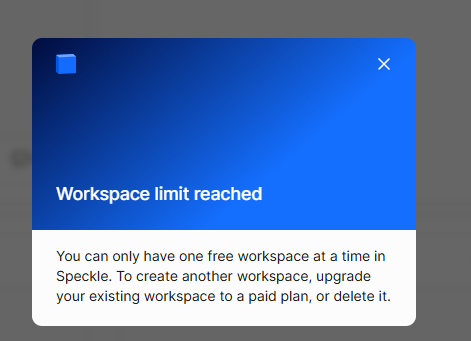
The limit is per person (per individual email address), not per organisation. Each person in your organisation can have one free (Explore) workspace. The fair usage policy applies per email address, not per email domain. Organisations with very many free workspaces are monitored for abuse; fair use is intended for trial and exploration, not sustained commercial use.
If you try to create another free workspace, you will see the workspace limit dialog. From there you can upgrade your existing workspace to a paid plan or delete it to create a new one.
 ## Public links and viewer behavior
Yes, when a version is no longer accessible in Explore, its public link becomes unavailable as
well. Public links do not bypass version visibility rules; they reflect what the workspace can
access. Upgrade the workspace to regain access to the version and restore the public link.
## Public links and viewer behavior
Yes, when a version is no longer accessible in Explore, its public link becomes unavailable as
well. Public links do not bypass version visibility rules; they reflect what the workspace can
access. Upgrade the workspace to regain access to the version and restore the public link.