

Here’s what’s changing
More access, fewer barriers
We’re moving away from seat-based pricing, so you can invite stakeholders to view and interact with project data without worrying about user license costs. Instead, the new plans will be based on the number of syncs and versions. A sync is either the creation of a new model version or a productive receive. A productive receive happens when you:- Receive a model in an authoring app, and we coordinate around it.
- Receive a model in a dashboard app, and we derive something from it.
- Receive a model in an automation, and we do something with it.
Clearer user management
Previously, Speckle plans distinguished between editors and viewers. We’ve simplified this to a single user type for clearer licensing and easier management. For organizations needing more users than their plan allows, Enterprise offers the flexibility and scale to support larger teams.A better explore experience
Our Explore plan now includes the ability to create a custom project dashboard in Speckle Intelligence, giving you a real taste of how Speckle can turn your data into insights that bring business value.New team plan for active project delivery
Manage up to 5 projects and give 10 team members, perfect for teams ready to scale their BIM data workflows. See our pricing page for more details.Enterprise gets even more value
Unlock unlimited users and projects so your entire organization can access the data they need, when they need it. See our pricing page for more details.Transitioning from Starter and Business plans
Our legacy Starter and Business plans are retiring as we shift away from seat-based pricing, which limits the number of stakeholders who can access Speckle. If you’ve been using these plans, our team will contact you to help you switch to the plan that best meets your needs. We’re glad to work with you to ensure a smooth transition. Our goal is to make Speckle more accessible, predictable, and aligned with the value it brings to your projects. These new plans are designed to better reflect how AEC teams use Speckle day-to-day and are shaped directly by customer feedback. As the new pricing comes into effect, we’ll continue to be available to help—working closely with you to address individual needs. We’re genuinely grateful for the trust you’ve placed in Speckle and remain committed to supporting your work!FAQ
Transition from old plans
What changes when the new plans launch?
What changes when the new plans launch?
How will I know which new plan my workspace will be 'mapped' to?
How will I know which new plan my workspace will be 'mapped' to?
If I take no action, will my workspace be upgraded automatically?
If I take no action, will my workspace be upgraded automatically?
How do the new plans compare to legacy plans?
How do the new plans compare to legacy plans?
Will historical version data be preserved when moving from an old plan to a new tier?
Will historical version data be preserved when moving from an old plan to a new tier?
New plans
What are Speckle's new plans?
What are Speckle's new plans?
How is Speckle being priced right now?
How is Speckle being priced right now?
What is a sync?
What is a sync?
What is a version?
What is a version?
How many syncs, versions, or users are included in the new plans?
How many syncs, versions, or users are included in the new plans?
Which plan do I need to keep my workflows running?
Which plan do I need to keep my workflows running?
What happens when I downgrade my plan (projects, dashboards, users, versions, links)?
What happens when I downgrade my plan (projects, dashboards, users, versions, links)?
- Extra projects and dashboards become inactive until you upgrade again
- Existing users beyond the allowed limit remain, but you cannot add new users
- In the Explore plan, versions older than 30 days are no longer accessible, and any public links tied to those versions stop working
- Upgrading restores access to retained projects, dashboards, versions, and links
How do limits apply across workspaces, users, and collaborators?
How do limits apply across workspaces, users, and collaborators?
- Model and version limits apply to the entire workspace
- Models created by any colleague count toward workspace limits
- User limits apply to the total number of users, whether internal or external collaborators
What does 'Monthly Syncs' mean?
What does 'Monthly Syncs' mean?
What happens if we exceed Monthly Syncs or version limits?
What happens if we exceed Monthly Syncs or version limits?
How does Forma Data Management (ACC) integration work across plans?
How does Forma Data Management (ACC) integration work across plans?
Can I choose a data region or use SSO on my current plan?
Can I choose a data region or use SSO on my current plan?
How can I monitor workspace usage (versions and syncs)?
How can I monitor workspace usage (versions and syncs)?
How should we estimate our monthly sync needs before choosing a plan?
How should we estimate our monthly sync needs before choosing a plan?
My organisation works on multiple client jobs; which tier supports more than one project?
My organisation works on multiple client jobs; which tier supports more than one project?
What happens to my dashboards if my plan changes?
What happens to my dashboards if my plan changes?
How do dashboards affect my usage and sync count?
How do dashboards affect my usage and sync count?
Why did my Automate functions stop running or show a permission error?
Why did my Automate functions stop running or show a permission error?
When I upgrade from Explore to Team, does billing start immediately?
When I upgrade from Explore to Team, does billing start immediately?
Versions
Versions older than 30 days are no longer accessible in my Explore workspace; how can I retrieve them?
Versions older than 30 days are no longer accessible in my Explore workspace; how can I retrieve them?
How can I see the total number of versions my workspace has stored across all projects/models?
How can I see the total number of versions my workspace has stored across all projects/models?
What happens if our workspace exceeds its total version storage limit?
What happens if our workspace exceeds its total version storage limit?
Sync usage
What does 'Monthly Syncs' mean on my plan, and how is it calculated?
What does 'Monthly Syncs' mean on my plan, and how is it calculated?
- Receive a model in an authoring app, and we coordinate around it.
- Receive a model in a dashboard app, and we derive something from it.
- Receive a model in an automation, and we do something with it.
Why does the plan show monthly sync limits if nothing stops when we exceed them?
Why does the plan show monthly sync limits if nothing stops when we exceed them?
What happens if my workspace exceeds the monthly sync limit for the month?
What happens if my workspace exceeds the monthly sync limit for the month?
How can I see how many syncs our workspace is currently using?
How can I see how many syncs our workspace is currently using?
Do syncs reset monthly or accumulate across the year?
Do syncs reset monthly or accumulate across the year?
How should we estimate our monthly sync needs before choosing a plan?
How should we estimate our monthly sync needs before choosing a plan?
Projects
I can no longer create new projects on Explore. How do I continue my work?
I can no longer create new projects on Explore. How do I continue my work?
My organisation works on multiple client jobs; which tier supports more than one project?
My organisation works on multiple client jobs; which tier supports more than one project?
If I downgrade to Explore and have more than one project, what happens to the extra projects?
If I downgrade to Explore and have more than one project, what happens to the extra projects?
Does each Forma Data Management / ACC-connected project count as a project in Speckle?
Does each Forma Data Management / ACC-connected project count as a project in Speckle?
Can I move a project from Explore to Team without losing versions or comments?
Can I move a project from Explore to Team without losing versions or comments?
Models
If a colleague creates a model in the same workspace, does it count against my limit?
If a colleague creates a model in the same workspace, does it count against my limit?
Users and roles
Does Team limit the number of external collaborators?
Does Team limit the number of external collaborators?
If a workspace downgrades, what happens to users beyond the allowed limit?
If a workspace downgrades, what happens to users beyond the allowed limit?
Dashboards and intelligence
I created multiple dashboards during the beta, but I can now access only one. Where did the others go?
I created multiple dashboards during the beta, but I can now access only one. Where did the others go?
What happens to dashboards if I downgrade from Team to Explore?
What happens to dashboards if I downgrade from Team to Explore?
Do dashboard templates count toward dashboard limits?
Do dashboard templates count toward dashboard limits?
Why does editing a dashboard count towards sync usage?
Why does editing a dashboard count towards sync usage?
Automate
Why did my Automate functions stop running or show a permission error?
Why did my Automate functions stop running or show a permission error?
Forma Data Management (ACC) integration
What happens to existing Forma Data Management / ACC connections if I downgrade from Team or Enterprise?
What happens to existing Forma Data Management / ACC connections if I downgrade from Team or Enterprise?
Permissions and security
Billing and upgrades
When I upgrade from Explore to Team, does billing start immediately?
When I upgrade from Explore to Team, does billing start immediately?
If I downgrade, when do project and model limits apply?
If I downgrade, when do project and model limits apply?
Does upgrading immediately unlock previously expired versions?
Does upgrading immediately unlock previously expired versions?
If I upgrade mid-cycle, is the charge prorated?
If I upgrade mid-cycle, is the charge prorated?
Do billing changes apply per workspace or per organisation?
Do billing changes apply per workspace or per organisation?
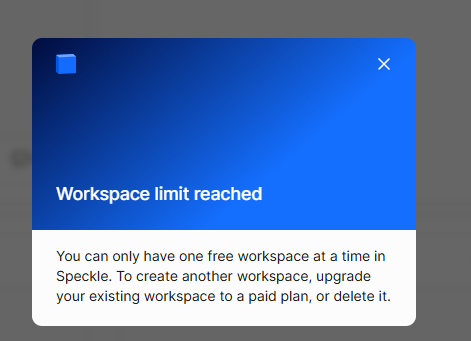
Does the free workspace limit apply per organisation or per person?
Does the free workspace limit apply per organisation or per person?
Public links and viewer behavior
Do public links stop working if a version expires under the Explore 30-day window?
Do public links stop working if a version expires under the Explore 30-day window?