Use this guide when one Grasshopper definition is becoming too large, or when multiple people or tools need to work on different stages of the same pipeline. It shows how to treat Speckle models as the
interfaces between Grasshopper modules. For users who already send and receive data with Speckle in Grasshopper.
Before you start: You need the Speckle Grasshopper connector installed and basic familiarity
with Send and Receive components. If you are new to Speckle in Grasshopper, see the
Grasshopper connector guide first. When To Componentise A Grasshopper Definition
When to use: Your definition is complex enough that separate files or owners make sense.
Identify natural module boundaries
Look for stages that already exist in your definition such as “base geometry generation”,
“analysis setup”, “visualisation prep”, or “documentation”. Each of these is a candidate module.
Decide what each module owns
For each stage, decide what it is responsible for producing (e.g. cleaned room solids with
metadata, analysis meshes, layout curves). These become the public outputs that downstream
modules rely on.
Check who needs to work on each stage
If different people or teams own different stages (e.g. design vs analysis), componentising
makes collaboration clearer. Even for one person, modules help separate experiments from stable
logic.
Design The Speckle Interfaces Between Modules
When to use: Before creating separate Grasshopper files.
Create a Speckle project and models for the workflow
In Speckle, create a project that will hold all models for this workflow. For each module, plan one or more models or branches (e.g. 01_base-geometry, 02_analysis-input, 03_visualisation). A typical pipeline: one module publishes base geometry to a model; a second consumes it and publishes analysis input; a third consumes that and produces documentation or exports.A pipeline diagram (project → models → modules) can be added here as a visual reference. The flow is: Upstream GH file → Send → Speckle model/branch → Receive → Downstream GH file.
Define the contract for each module output
For each module, decide what data will be sent to Speckle. Be explicit about object types, required properties, naming, and units. Treat this as a contract: downstream modules should be able to rely on it
remaining stable.
Choose how you will version data
Decide whether downstream modules should always use the latest version on a branch or pin to specific versions for repeatable runs. For automated or production workflows, prefer pinned versions to avoid
surprises.
Build An Upstream Module That Publishes To Speckle
When to use: Creating the first module in the chain that produces data for others.
Start a Grasshopper file for the module
Copy only the part of your existing definition that belongs to this module into a new Grasshopper file. Keep its inputs focused on what this module actually needs to run.
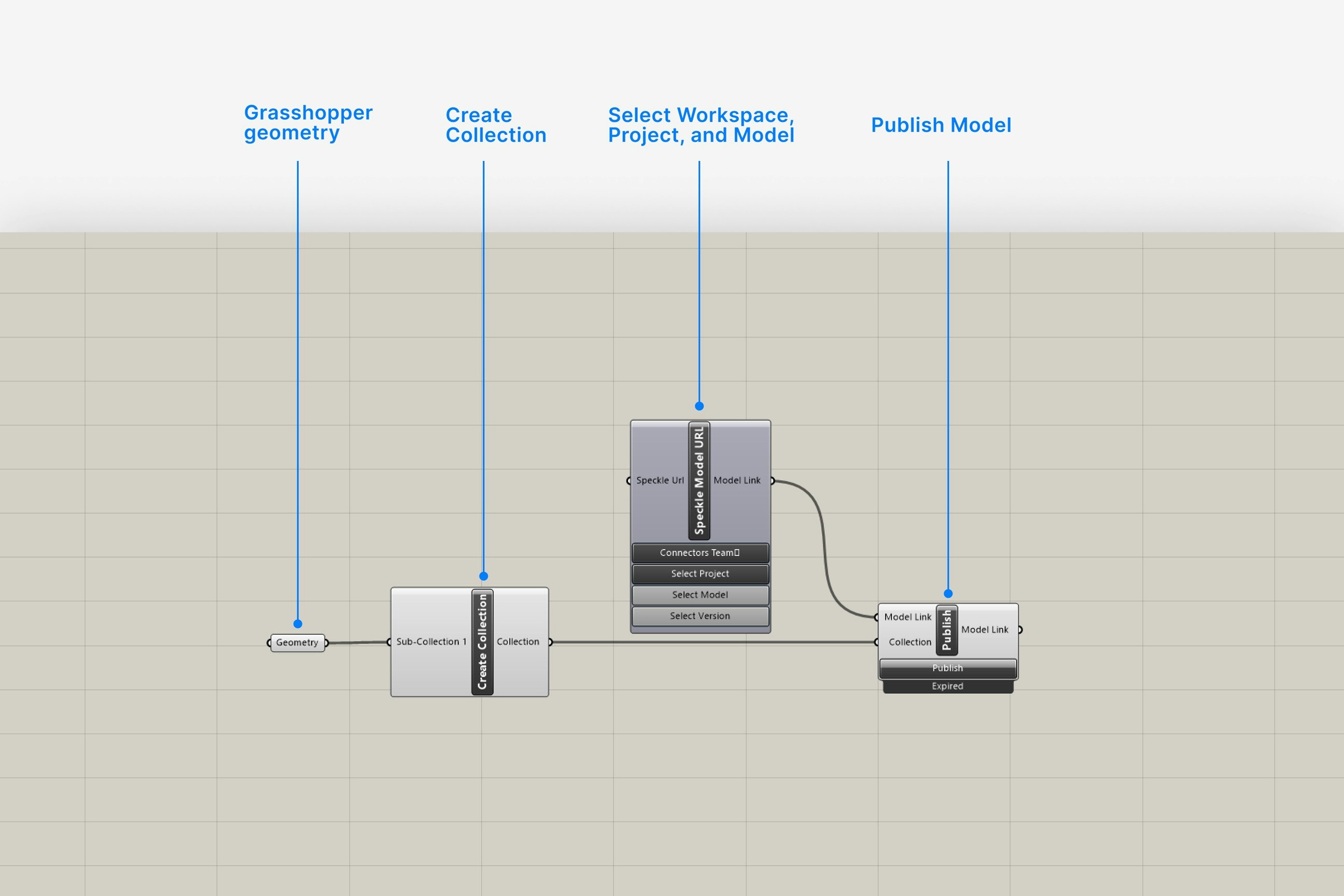
Add a Speckle Send component at the output
Place a Send component from the Speckle Grasshopper connector at the point where you want to expose data. Connect the geometry and data you identified in your contract as its input. Configure account, server, project, and model
Set up the Send component with the correct Speckle account, server, project, and model or branch name (e.g. 01_base-geometry). Use clear, stable names that reflect the module’s role.
Shape data for downstream consumers
Before sending, clean and structure the data: group elements logically, ensure important properties are present and named consistently, and avoid sending unused or experimental data. Aim for a tidy object
graph that downstream modules do not need to reinterpret.
Publish and verify in Speckle
Run the definition and send data. Open the project in Speckle, inspect the model, and confirm that objects, properties, and naming match your intended contract.
Build Downstream Modules That Consume Speckle Models
When to use: Creating modules that depend on data from earlier stages.
Start a new Grasshopper file per downstream module
Create a separate Grasshopper definition for each downstream stage (e.g. analysis, reporting, documentation). Keep inputs and outputs explicit so the file is easy to reason about.
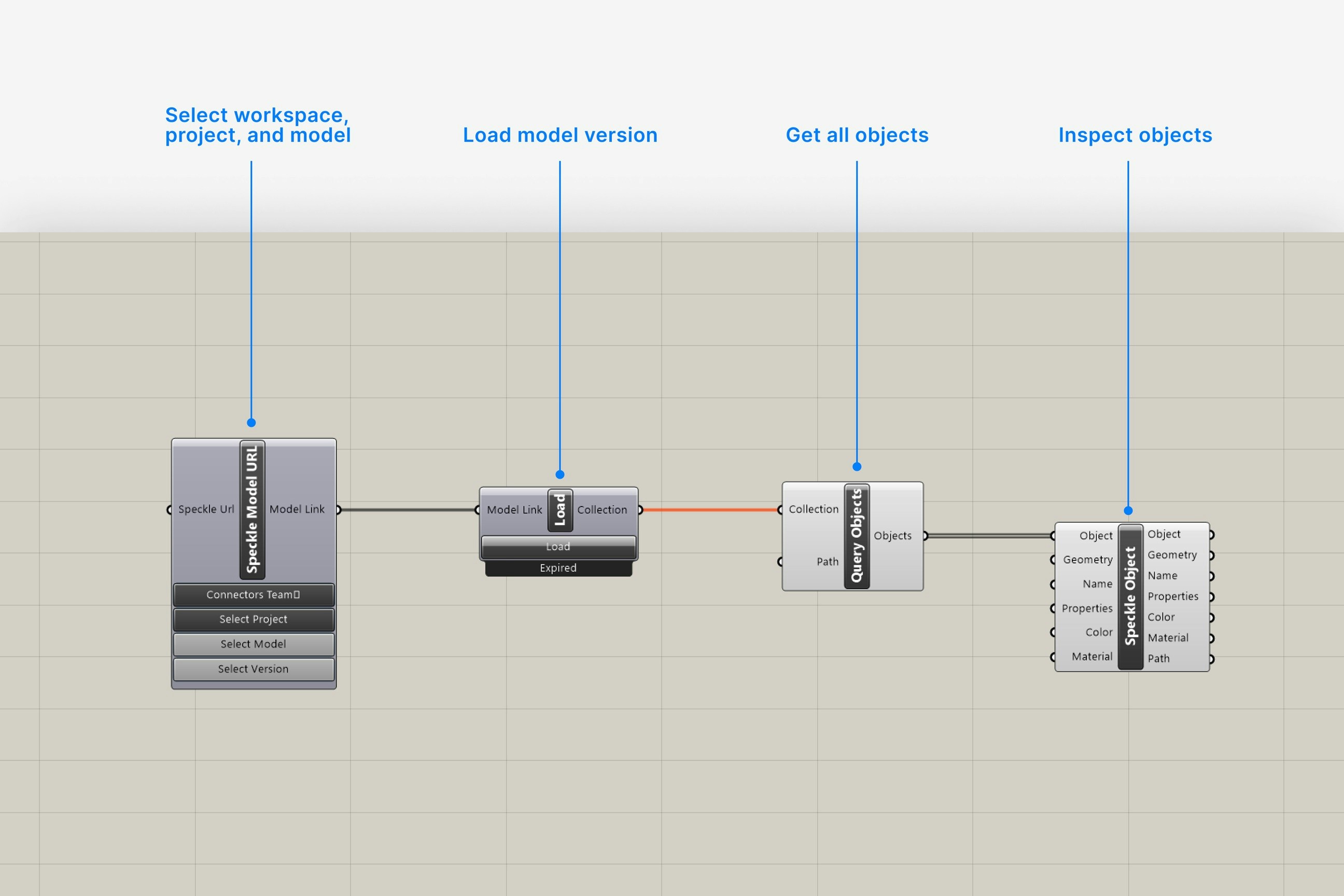
Add Speckle Receive components for upstream models
Place one or more Receive components and configure them to point at the upstream models or branches (e.g. 01_base-geometry). If stability matters, pin the receiver to a specific version. Adapt received data to local needs
Convert received objects into the types, structures, and units this module uses internally. This is also where you can add module‑specific properties or perform filtering based on tags or parameters.
Optionally publish this module's outputs
If another module will consume this stage, add a Send component at your module’s output and repeat the configuration and shaping steps. Choose a model or branch that clearly names this stage (e.g.
02_analysis-input).
Test modules together
Run the upstream module to publish fresh data, then run the downstream module and confirm that receivers pick up the expected objects. Fix any contract mismatches before adding more complexity.
Assign clear ownership per module
Decide who owns each module and where its Grasshopper file lives (e.g. version‑controlled
repository). Owners are responsible for keeping the Speckle contracts stable and documented.
Document contracts alongside the files
For each module, record which Speckle project, models, and branches it reads and writes, and
what each output contains. A short README next to the Grasshopper file is often enough.
Agree on change management
Establish how upstream changes are communicated. For example, require a brief note whenever
object structure or key properties change, and schedule time for downstream owners to adapt.
Run modules on appropriate machines
Let heavy geometry or analysis modules run on powerful workstations or dedicated machines, while
lighter reporting or visualisation modules can run elsewhere. Speckle models carry the data
between them.
Common Patterns And Pitfalls
- Pattern: Linear pipeline
- One module publishes base geometry; another prepares analysis input; a third produces documentation or exports. Each stage reads from and writes to a dedicated Speckle model.
- Pattern: Branching workflows
- A single upstream model feeds multiple downstream modules (e.g. daylight analysis, cost estimation, visualisation). All downstream receivers point at the same upstream branch or version.
- Pitfall: Sending everything
- Publishing the entire Grasshopper state makes downstream modules brittle and hard to understand. Instead, send only what is needed and keep contracts small.
- Pitfall: Unannounced schema changes
- Changing property names or structures without coordination breaks downstream modules. Treat contracts as shared APIs and change them deliberately.
FAQ
How many modules should a workflow have?
Use as many modules as you need to keep responsibilities clear and files manageable. A common
pattern is 2–4 modules (e.g. base geometry, analysis prep, reporting, and exports) rather than a
large number of very small ones.
Can multiple downstream modules consume the same Speckle model?
Yes. Any number of Grasshopper files or other tools can receive from the same project, model,
and branch. This is a good way to centralise base geometry and fan out into specialised
workflows.
Should downstream modules always use the latest version?
For exploratory work, using the latest version keeps things simple. For repeatable analysis or
production runs, pin receivers to specific versions so results can be reproduced and compared
reliably.
How do I debug issues between modules?
First, inspect the upstream Speckle model in the web viewer to confirm that objects and
properties look as expected. Then check the Receive component configuration and any conversion
logic in the downstream file. Work from the interface inwards rather than from deep inside the
definition.
Can non-Grasshopper tools participate in the workflow?
Yes. Any tool with a Speckle connector or SDK can read from and write to the same models and
branches. For example, analysis tools, dashboards, or scripts can consume the outputs of
Grasshopper modules or publish new stages in the pipeline.
How big can the Speckle models between modules get?
Models can grow large, but very heavy payloads will affect send/receive times and downstream
performance. If models become unwieldy, consider splitting them by discipline, zone, or purpose
so modules only consume what they need.
Do I need Automate for componentised workflows?
No. Componentised workflows work with manual sending and receiving. Automate becomes useful when
you want these modules to run automatically on triggers, but it is not required for the pattern
itself.
See Also
Last modified on September 7, 2026